Quotes and Order Forms Out in a Minute. The CRM Updates Itself.
Send from a template, from the deal, from Slack or by forwarding an email. Reminders chase the buyer for you, and when they sign, the deal stage moves and the signed PDF is attached.
- Zoho CRM, HubSpot and Salesforce
- Signing links on WhatsApp
- Email from your own domain
 Deal
 FlowVerify connected
Northwind Systems — Order Form FY27
Owner Karthik · Close date 20 Nov 2026
₹21.4 lakh
Activity
- Order form sent from the templateKarthik · 11:02
- Viewed by Meera ShahNorthwind Systems · 11:20
- Signed by Meera ShahOn a phone · 14:36
- Stage moved to Closed wonNote logged by FlowVerify · 14:36
01Where a deal waits
A Yes on the Call Is Not a Signature
Between the buyer saying yes and the signed copy reaching the deal, the paperwork waits four times. None of the four is selling.
Wait 1 · Buyer says yes to document out
For the Right Document
The last order form is in someone’s sent folder, with another customer’s name still in it.
A template with the buyer’s details filled in, out in about a minute.
Wait 2 · Document out to opened
To Be Opened
The email sits unread, and nobody knows whether to call.
It goes by email from your own domain and by WhatsApp, with a verified sender badge.
Wait 3 · Opened to signed
To Be Signed
It was opened on Tuesday. It is now Friday.
Reminders chase for you, and you are told why it has stalled.
Wait 4 · Signed to on the deal
To Be Recorded
The signed PDF is in an inbox and the deal still says Proposal.
The stage moves, a note is logged and the signed PDF is attached.
02How it works
Send, Chase and Record Without Leaving the Deal
Four steps in the order they happen. The link in each card goes to the page that covers that part of FlowVerify.
- 01
Send From Where the Deal Is
Start from a template, from the deal in your CRM, from Slack with /flowverify send, or by forwarding the email with the attachment. FlowVerify prepares the draft and you confirm it before anything goes out.
Templates and sending- Template
 CRM deal
 Slack
# sales-northKarthik 11:01
/flowverify send
FlowVerify App11:01
Draft ready: Order Form FY27 — Northwind Systems
1 signer · Meera Shah · due Fri 20 Nov
Review and sendNothing goes out until you confirm. - 02
The Buyer Signs on a Phone
The signing link arrives by email from your own domain and on WhatsApp, with a verified organisation badge so the buyer knows who is asking. They confirm a one-time code and sign, with no account and no app. For a larger deal, ask for Aadhaar eSign instead.
Aadhaar eSign
Meera Shah’s phone
Kiran Exports Private Limited has sent you Order Form FY27 to sign.
Open the document
11:02
A link only. The document itself is never sent on WhatsApp.
Verified organisationEmail from
Kiran Exports [email protected]
- 03
Reminders Chase for You
The follow-up agent plans the reminders for each signer: the hour they tend to open email, email first and then SMS or WhatsApp, a cap on how many, and a stop at the deadline. You are not the one who has to remember.
Reminders and follow-upOrder Form FY27 — Northwind Systems
Follow-up on · up to 5 reminders
Signed- SentMon 11:02Email, WhatsApp
- ReminderWed 10:00Email
- ReminderFri 10:00SMS
- SignedFri 14:36On a phone
Email first, then SMS and WhatsApp. Reminders stop when the buyer signs or declines, or when the deadline passes.
- 04
The CRM Updates Itself
With Zoho CRM, HubSpot or Salesforce connected, the deal follows the document. When it is sent, signed or declined, the stage moves, a note is logged and the signed PDF is attached to the deal.
CRM connectorsCRM sync
Workspace connection

Deal stage
- When it is sentContract sent
- When it is signedClosed won
- When it is declinedClosed lost
On every event
- Log a note
- Attach the PDF
- Update the contact
03The paperwork
The Paper That Closes a Sale
From the first NDA to the renewal a year later. Each one goes out from a template and comes back signed to the same place.
Quote
From a template, with the buyer’s name and prices filled in. Signed with a one-time code.
TemplateOrder Form
Sent from the deal. The stage moves when the buyer signs.
CRM syncMaster Services Agreement
Checked against your playbook before it goes out, then routed to an approver.
Statement of Work
Both signers in order, and the signed copy filed in the same folder as its MSA.
Mutual NDA
A starter template written for India, out before the first proper call.
Starter templateRenewal Order
The repository reminds you before the renewal date, so the order goes out on time.
Distribution Agreement
Aadhaar eSign for the signatures that need it, and an e-stamp certificate ordered at Send.
Partner or Reseller Agreement
Signed inside your own partner portal with an embedded signing session.
04In depth
What Sales Teams Use Most
The parts of FlowVerify that take work off a rep and a sales manager, shown on the product.
Today page
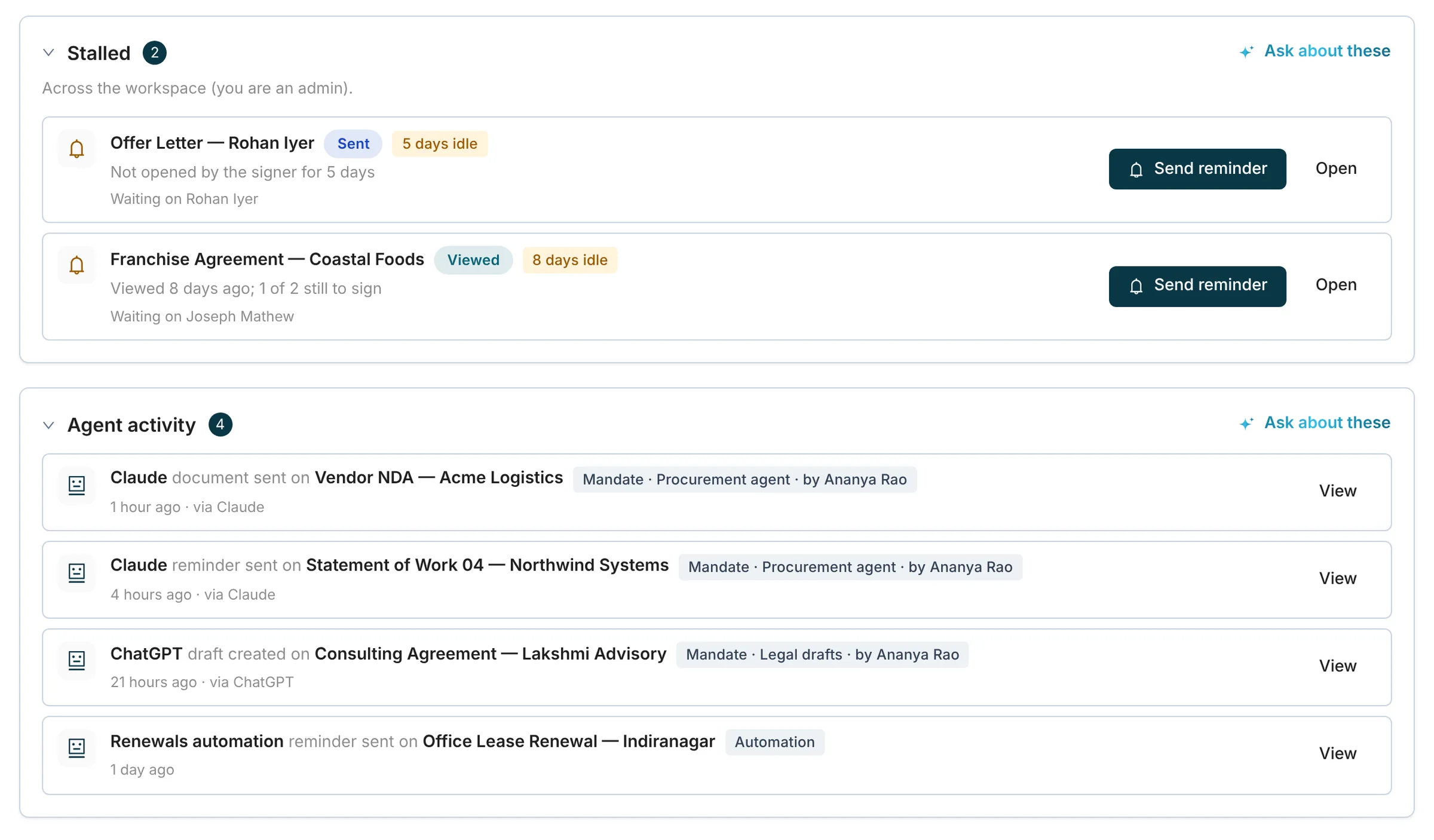
Know Why a Deal Document Has Stalled
The Today page lists every document that has stopped moving, with the reason in plain words: not opened, opened but not signed, an email that bounced, a signer who could not pass the one-time code. One click sends the reminder.
- The reason comes from what the signer did, not from a guess
- Each sender gets a daily digest of their stalled documents
- Anything an agent or an automation sent is listed with the mandate it acted under
Write With AI, in the Buyer’s Language
Invites and reminders drafted from the document, in your workspace’s tone, in English, Hindi, Kannada, Tamil, Telugu or Marathi. You read it before it goes.
Reminder to Meera Shah
Order Form FY27 — Northwind Systems
नमस्ते मीरा जी, ऑर्डर फ़ॉर्म FY27 आपके हस्ताक्षर के लिए तैयार है। कृपया शुक्रवार, 20 नवंबर तक इसे देखकर हस्ताक्षर कर दें। कोई प्रश्न हो तो मुझे बताएँ।
धन्यवाद, कार्तिक
Tone: friendly · Sign-off from workspace settings
What the buyer receives
Kiran Exports [email protected]
Verified organisationनमस्ते मीरा जी, ऑर्डर फ़ॉर्म FY27 आपके हस्ताक्षर के लिए तैयार है।
Signing Inside Your Own Portal
Open the signing step inside a checkout or a partner portal. The session is single-use and lasts 15 minutes, and every check you set still runs.
Developer platformPartner onboarding · Step 3 of 3
Distributor Agreement
Single-use session, valid for 15 minutes. The signer still verifies with a one-time code.
Turnaround You Can See
What was sent, what completed and how long it took, by template, by team and by sender. Export any view as CSV for the Monday review.
Usage
Last 30 days
| Template | Sent | Completed | Median |
|---|---|---|---|
| Order Form | 42 | 39 | 6 h |
| Quote | 118 | 97 | 1 d 2 h |
| MSA | 9 | 7 | 4 d |
Sample workspace figures. Export any view as CSV.
05Before you roll it out
What RevOps and IT Will Ask
Short answers to the questions that come up before a tool is connected to the CRM.
Access
Reps see their own documents, managers see their department’s and admins see everything. Single sign-on and two-factor for your team.
Evidence
Every signed order carries a certificate of completion and an audit trail. Anyone holding the PDF can check it on a public verification page.
Evidence and verificationAI controls
Write with AI runs only after a workspace admin accepts the AI terms, and has its own switch. India-only processing is available, and reminders and CRM updates use no model at all.
Deployment
Shared cloud, or a dedicated single-tenant deployment. CRM connections belong to the workspace and their tokens are stored encrypted.
Security
Other teams
The Same Workspace, Used Differently
- HROffer Letters and Joining FormsJoiner listBulk sendSigned
- LegalDrafts, Redlines and EvidenceClausesRedlineEvidence pack
- Finance & ProcurementVendor AgreementsTerms checkedSignedReminder
- Founders & Small BusinessesOne Tool Instead of ThreeDraftSignTrack dates
- Developers & AI TeamsAPI, SDKs and an MCP ServerAPI or MCPMandateWebhook on signed
Zoho CRM, HubSpot and Salesforce. When a document is sent, signed or declined, the deal stage moves to the stage you mapped, a note is logged and the signed PDF is attached. The connection belongs to the workspace, so it keeps working when the person who set it up moves on. Zapier covers other apps.
Yes. Send from the deal in the CRM, type /flowverify send in Slack, or forward the email with the attachment to your personal send address. FlowVerify prepares the draft with recipients and fields, and nothing is sent until you confirm it.
No. The buyer opens the link from email or WhatsApp, confirms a one-time code and signs in the browser on their phone. A verified organisation badge shows them who sent it.
They are capped and timed. By default the follow-up agent sends at most five reminders per signer, never between 21:00 and 08:00, and it stops when the buyer signs or declines or when the deadline passes. You can change the limits for the workspace or for one document, and you can still send a reminder by hand.
Yes, with embedded signing. Your server asks for a signing session, which is a single-use link valid for 15 minutes, and opens it inside your page. The signer still verifies with a one-time code or Aadhaar eSign, exactly as they would from the email.
Contracts signed electronically are recognised under the Information Technology Act, 2000. Every completed document carries a certificate of completion and an audit trail, and anyone holding the signed PDF can check it on a public verification page. The Act leaves out a short list of documents, such as wills and most powers of attorney. Commercial quotes and order forms are not on that list.
Book a demo
See It on Your
Own Order Form
Bring your order form or your quote. We send it from a deal, sign it on a phone, and watch the stage move in the CRM.
What you get
- Your order form set up as a template
- A send from a deal, signed on your phone
- Answers from the people who build it