Build Signing Into Your Product. Or Give an Agent a Mandate.
Scoped API keys, an idempotency key on every send, a test mode that never emails or charges anyone, and webhooks you can verify. When an agent takes over, it uses the same API through the MCP server, inside a mandate an admin sets.
- TypeScript and Python SDKs
- Signed webhooks
- Agent actions named on the certificate
Test modenobody is emailed, nothing is charged
Requestyour server → api.flowverify.co
pendingPOST /v1/templates/{id}/envelopesAuthorization: Bearer fv_test_••••••••Idempotency-Key: order-1042{ "reference": "order-1042", "recipients": [{ "role": "signer_1", "name": "Farah Qureshi", "email": "[email protected]" }], "variables": { "amount": "₹2,40,000" } }{ "success": true, "data": { "reference": "FV-2611-131", "status": "sent", "is_test": true } }The signer verifies and signs in FlowVerify’s signer app. Test code 000000.
Webhookapi.flowverify.co → your server
waitingPOST /flowverifyX-FV-Event-Type: envelope.completedX-FV-Signature: t=1794822127,v1=9c1f0e7a…{ "type": "envelope.completed", "livemode": false, "data": { "envelope": { "reference": "FV-2611-131", "status": "completed" } } }Signature verified against the raw body. Your server answers 200.
01Build or call
What You Would Otherwise Build and Run
Signing looks like a PDF and a button until you list what sits behind it. On the left, the systems a team ends up owning. On the right, the call that replaces each one.
Build it yourselfCertify every PDF and stamp each signature, so that a later change to the file shows.
Call FlowVerifyOne
EnvelopesPOST. Sending certifies the document, and the signed PDF comes back through the same API with its certificate of completion.Build it yourselfDeliver one-time codes by email and SMS, and reminders on WhatsApp, with opt-outs handled.
Call FlowVerify
Recipientsauthon a recipient asks for a code by email or SMS.channels.whatsappadds WhatsApp for the invite and reminders, and stops when the signer replies STOP.Build it yourselfIntegrate Aadhaar eSign through a licensed Certifying Authority, and keep that integration working.
Call FlowVerify
Aadhaar eSignsigning_method: "aadhaar"on the envelope. The signer authenticates with an OTP on the mobile linked to their Aadhaar, and FlowVerify never stores the Aadhaar number.Build it yourselfWork out where the signature goes on every PDF your own system generates.
Call FlowVerify
Text anchorsfields[].anchorquotes text printed on the page, and the field is placed beside the match.Build it yourselfMake every retry safe, so that a timeout never sends the same agreement twice.
Call FlowVerifyAn
IdempotencyIdempotency-Keyon each create and send. The same key and body replay the first response for 24 hours.Build it yourselfPoll for status, or run a dispatcher of your own with signatures, retries and a delivery log.
Call FlowVerify
Webhooksenvelope.completedarrives as a signed webhook. A failed delivery is retried on a schedule, kept in a 30-day log and can be replayed.Build it yourselfBuild a signing screen, with identity checks, consent and an audit trail behind it.
Call FlowVerifyA signing session opens FlowVerify’s signer app inside your product, by redirect or in a frame. Every check the sender set still runs.
Embedded signingBuild it yourselfStand up a sandbox that cannot email a real customer by mistake.
Call FlowVerifyA key that starts with
Test modefv_test_. The endpoints, payloads and error codes are the same, and nobody is contacted.
02The integration
The Integration, Commit by Commit
A team adding signing to its own product merges five changes. Each one is shown as the code that lands in the repository, with what comes back when it runs.
1chore: add the FlowVerify client
Start With a Test Key
Once your workspace is set up, create a key in the Test environment under Developers, API keys. It runs the whole flow: documents are certified, statuses move and webhooks fire, while nobody is emailed, texted or messaged on WhatsApp and nothing is charged. Signers verify with the fixed code
Test mode guide000000.lib/flowverify.tsTypeScriptimport { FlowVerify } from '@flowverify/sdk'; // FV_API_KEY is fv_test_… on laptops and in CI, // and fv_live_… in production. Nothing else changes. export const fv = new FlowVerify({ apiKey: process.env.FV_API_KEY! }); const me = await fv.account.me(); console.log(me.api_key.environment); // "test"TESTNo email, SMS or WhatsApp is sent.One-time code0000002feat: send the order form from a template
Send From a Template, Exactly Once
The template holds the document, the signing roles and the fields. Your call names the signer and fills the variables by name. The idempotency key is derived from your own order id, so a job that runs twice replays the first response and sends nothing new.
SDK guideorders/send-order-form.tsTypeScriptimport { idempotencyKey } from '@flowverify/sdk'; import { fv } from '../lib/flowverify'; export const sendOrderForm = (order: Order) => fv.templates.createEnvelope( process.env.FV_ORDER_FORM_TEMPLATE!, { reference: `order-${order.id}`, recipients: [{ role: 'signer_1', name: order.buyer, email: order.email }], variables: { amount: order.amount, delivery_by: order.deliveryBy }, }, { idempotencyKey: idempotencyKey('order', order.id) }, );201FV-2611-131status: sentThe same key againIdempotent-Replayed: true3feat: sign contracts the billing system generates
Place a Field by Quoting the Page
A PDF your own system generates never has its signature block at the same coordinates. Quote the text printed beside it and the field lands next to it; when the text appears more than once,
API referenceoccurrencesays which. If the page is still being read, the call answers409 text_not_readywith aRetry-After.contracts/send-rate-contract.tsTypeScriptconst draft = await fv.envelopes.create({ name, recipients: [signer] }); const file = await fv.envelopes.addFile(draft.id, { file: pdf, fileName }); const to = draft.recipients![0]!.id; // Quote the text printed beside each field. No coordinates. await fv.envelopes.addFields(draft.id, { fields: [ { file_id: file.id, recipient_id: to, type: 'signature', anchor: { text: 'Authorised Signatory', placement: 'above' } }, { file_id: file.id, recipient_id: to, type: 'date', anchor: { text: 'Date:', occurrence: 2 } }, ], }); await fv.envelopes.send(draft.id);SignatureAuthorised SignatoryFor Sundaram Packagingfield.anchor.matchedpage: 4occurrence: 1total: 14feat: sign inside the customer portal
Open Signing Inside Your App
When the buyer clicks Sign, your server asks for a signing session and redirects to its URL. The URL opens once and lasts 15 minutes. The key needs the
Embedded signing guideembedded:signscope, the return address must be on your allowlist, and the signer still passes the one-time code and consent.routes/sign.tsTypeScript// The buyer clicked "Sign" in your portal. app.post('/orders/:id/sign', async (req, res) => { const order = await orders.get(req.params.id); const session = await fv.envelopes.createSigningSession( order.envelopeId, order.recipientId, { return_url: `https://portal.kiranexports.in/orders/${order.id}` }, ); res.redirect(303, session.url); // opens once, valid for 15 minutes });303signer.flowverify.co/embed/Q2s…then back at/orders/1042?status=signed5feat: mark the order signed
Listen for the Webhook, Then Swap the Key
Webhooks guideconstructEventchecks the signature over the raw body and rejects anything signed more than five minutes ago. Deliveries are at least once, so dedupe on the event id. Going live is a key swap: the endpoints, payloads and error codes are identical.routes/webhooks.tsTypeScriptapp.post('/flowverify', express.raw({ type: 'application/json' }), (req, res) => { try { const event = constructEvent({ rawBody: req.body, header: req.headers['x-fv-signature'], secret: process.env.FV_WEBHOOK_SECRET!, }); if (event.type === 'envelope.completed') markOrderSigned(event); res.sendStatus(200); } catch (err) { if (err instanceof WebhookSignatureError) return res.sendStatus(400); throw err; } });envelope.completedSignature verified200In productionFV_API_KEY=fv_live_••••••••
The same five changes in Python use the flowverify package.
03Agents
Or Hand the Same Calls to an Agent
The MCP server turns the API into 23 tools for Claude, ChatGPT, Cursor or an agent you build. A mandate from an admin decides what that agent may do, and each action is recorded under its name.
 Claude
 ChatGPT
 Cursor
- Any MCP client
1API or MCP
Connect a Client, or Your Own Agent
A client that speaks MCP over Streamable HTTP connects with an API key in a header. Claude and ChatGPT connect as apps, after a FlowVerify sign-in. An agent you build can skip MCP and pass its mandate through the SDK. Each one gets what its scopes allow and no more.
The MCP server.cursor/mcp.jsonMCP client{ "mcpServers": { "flowverify": { "url": "https://mcp.flowverify.co/mcp", "headers": { "Authorization": "Bearer fv_live_••••••••", "X-Agent-Mandate": "7f3a91c2-5b0e-…" } } } }agent.tsYour own agentconst fv = new FlowVerify({ apiKey: process.env.FV_API_KEY!, agentMandate: process.env.FV_AGENT_MANDATE, agentClient: 'onboarding-bot/1.2', });2Mandate
An Admin Sets the Limits
The mandate names the templates, the actions, the recipient domains, the sends per day and the expiry date, and can require a preview before every send. A call outside it is refused before anything is certified or emailed. Revoking the mandate stops the agent at once.
Agent mandatesMandate · Procurement agent
Agent “Claude” · issued by Shalini Bose
Active- Templates
- Vendor NDA, Purchase Order
- Actions
- Create drafts, send, remind
- Recipient domains
- nandifreight.in, sundarampack.in
- Sends per day
- 3 of 20 used
- Preview first
- Required
The agent calls send_from_template
- dry_run: truePreview only, nothing sent
- confirm: trueSent as FV-2611-102
- to …@gmail.com403 mandate_limit_exceeded
details.limit: "allowed_recipient_domains"
3Webhook on signed
Signed, With the Agent on Record
When the last signer signs,
Evidence and verificationenvelope.completedreaches your endpoint as it does for any send. The run log, the audit trail and the certificate of completion each name the agent, its mandate and the person who issued it. Certificate of Completion
Vendor NDA — Nandi Freight
FV-2611-102 · Completed
- Farah QureshiEmail OTP16 Nov 2026, 12:26 IST
- Shalini BoseIn the dashboard16 Nov 2026, 14:05 IST
Sent by agent “Claude”, an automated information system, under mandate 7f3a91c2-5b0e-4d6a-9c1f-2e84b7a0d315 issued by Shalini Bose for Kiran Exports Private Limited (Information Technology Act, 2000, section 11(c)).
Signed document hash sha256 · 9f2c41…7be0a3
Scan the QR code to verify
04What teams build
What Teams Wire It Into
Six integrations engineering teams ship first. Each one is named with the calls, scopes and events it uses, as they are spelt in the API.
Customer Agreements at Checkout
The buyer signs inside your checkout or portal, in a session that opens once and lasts 15 minutes.
- POST …/signing-session
- embedded:sign
- ?status=signed
Loan and Lending Agreements
The borrower signs with Aadhaar eSign, using an OTP on the mobile linked to their Aadhaar. FlowVerify never stores the Aadhaar number.
- signing_method: "aadhaar"
- recipient.signed
Vendor Onboarding by a Procurement Agent
An agent sends the vendor NDA and the purchase order from approved templates, to approved domains, under a daily cap.
- X-Agent-Mandate
- send_from_template
- confirm: true
Offer Letters From an HR Bot
Your bot fills the letter from the HR record and sends it once, however many times the job retries.
- variables
- Idempotency-Key
- recipient.signed
Order Forms From a CRM
A deal closes, the order form goes out and the signed PDF comes back to the deal. Zoho CRM, HubSpot and Salesforce have ready connectors, and Zapier reaches the rest.
- POST /templates/{id}/envelopes
- envelope.completed
- GET …/download
Policy Acknowledgements in Bulk
One draft becomes one envelope per person, each with its own signing link and audit trail. Up to 5,000 recipients in one request.
- POST …/bulk-send
- bulk_send.completed
05The run log
Every Agent Call, as Your Admin Sees It
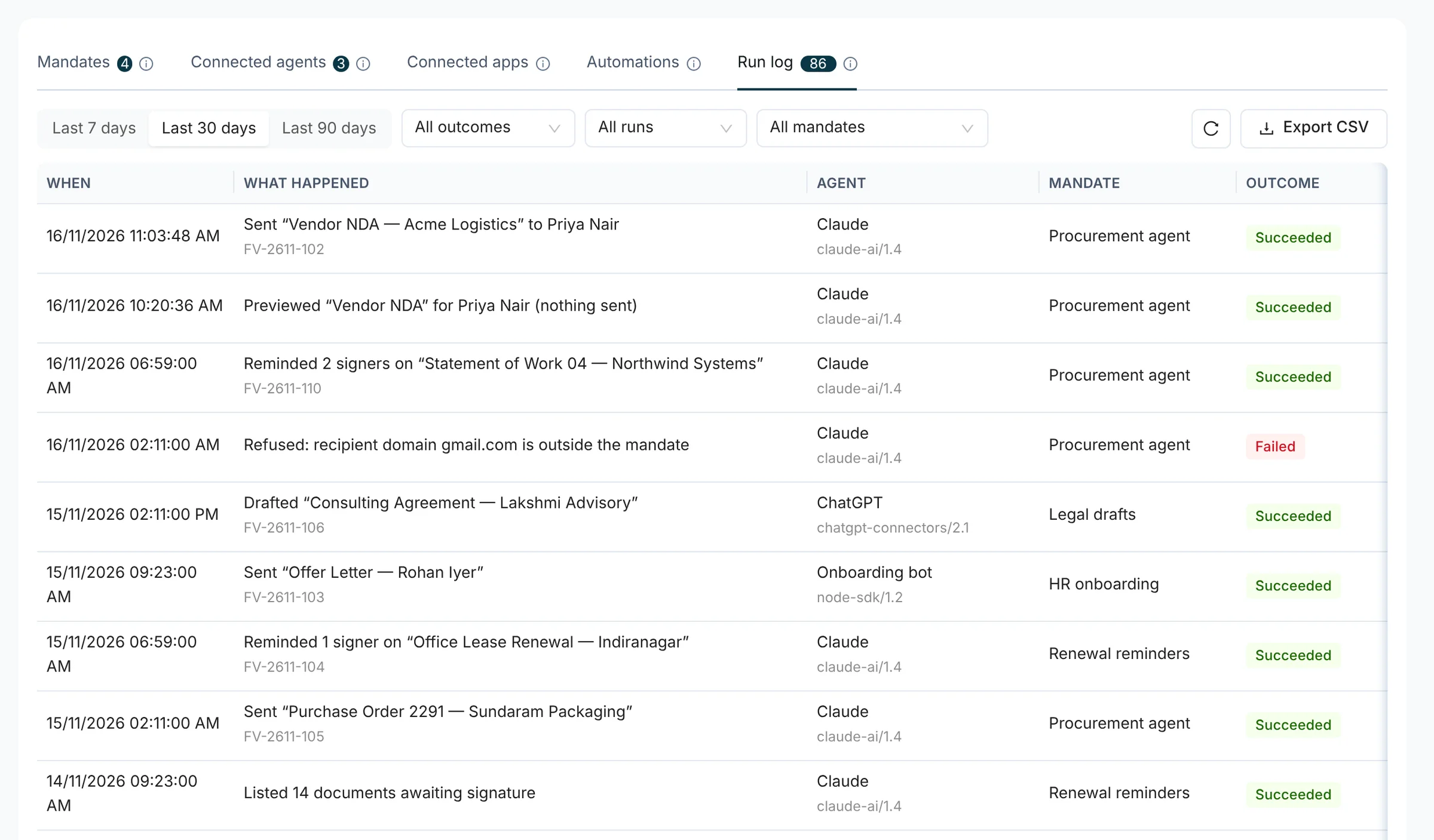
The Agents console lists each call made under a mandate: what happened, which client made it, which mandate it used and how it ended. A refusal is a row like any other.
- Client names and versions come from the MCP server, or from
agentClientin the SDK - Filter by outcome, by mandate and by date range, and export the log as CSV
- A refused call changes nothing and is counted on the mandate’s usage
- An agent reads its own limits and today’s usage from
GET /mebefore it acts
06Go deeper
Where to Go From Here
This page is the outline. These four hold the detail.
- Developer PlatformThe full API tour: the quickstart, webhooks, test mode, embedded signing and the developer console./developers
- MCP ServerThe tools an agent gets, how a client connects, and where each call stops./ai/mcp-server
- Agent MandatesEvery limit an admin can set, what a refusal looks like, and what is recorded./ai/agent-mandates
- API Docs (opens the developer docs in a new tab)Guides, the reference generated from the OpenAPI spec, both SDKs and the changelog.developers.flowverify.co
07Before you ship it
What Your Security Review Will Ask
Short answers for the review that happens before a key reaches production.
Access
Keys are scoped by resource and action, can be limited to your IP addresses and are shown once, after an admin confirms a one-time code. An id from another workspace answers 404. The console itself sits behind roles, single sign-on and two-factor.
Developer PlatformEvidence
Webhooks are signed with HMAC-SHA256 over a timestamp and the raw body, with a five-minute tolerance, and secrets rotate with a 24-hour overlap. Every envelope has an audit trail and a tamper-evident certificate of completion.
Webhooks guideAI controls
An agent acts only inside its mandate, each call lands in the run log, and no API call or agent signs for anyone. Model features run only after an admin accepts the AI terms, each has its own switch, and India-only processing is available.
Agent mandatesDeployment
Shared cloud, or a dedicated single-tenant deployment for one organisation. AES-256 at rest and TLS in transit.
Security
Other teams
The Same Workspace, Used Differently
- HROffer Letters and Joining FormsJoiner listBulk sendSigned
- SalesQuotes and Order FormsTemplateReminders chaseCRM updated
- LegalDrafts, Redlines and EvidenceClausesRedlineEvidence pack
- Finance & ProcurementVendor AgreementsTerms checkedSignedReminder
- Founders & Small BusinessesOne Tool Instead of ThreeDraftSignTrack dates
Yes. Once your workspace is set up, your developers create test keys themselves under Developers, API keys. A key that starts with fv_test_ creates test documents that never email, text, message on WhatsApp or charge anyone, while documents are still certified, statuses move and the certificate is produced. Webhooks carry livemode: false. Because no invitation goes out, you open the signing yourself with a signing session and enter the fixed code 000000. Aadhaar eSign is refused for test keys.
Nothing is sent twice. Every create and send takes an Idempotency-Key. The same key with the same body replays the first response for 24 hours, the same key with a different body is refused, and a request that is still running answers 409 so you can wait and retry. Both SDKs set a key on every such call and can derive one from your own record id.
No. The signer always signs in FlowVerify’s signer app, with the verification the sender chose. Your code can open that same flow inside your product with a signing session, and a workspace can sign with its own organisation certificate. Neither the API nor the MCP server has a call that signs for a third party.
Its mandate. An admin chooses the templates, the actions, the recipient domains, a daily send cap, a recipient limit and an expiry date, and can require a preview before every send. A request outside the mandate answers 403 mandate_limit_exceeded, names the limit and performs nothing. Through the MCP server, sending, reminding and voiding also need an explicit confirm. Revoking the mandate stops the agent at once.
Claude Code, Cursor, VS Code and any client that speaks MCP over Streamable HTTP and can send an Authorization header connect with an API key. Claude and ChatGPT connect as apps: a person signs in to FlowVerify, chooses the permissions, live or test mode and the mandate, and can disconnect the app later. Both routes reach the same tools and are held to the same limits.
Each delivery carries an X-FV-Signature header with a timestamp and an HMAC-SHA256 of the timestamp, a dot and the raw request body, keyed with the endpoint’s signing secret. Compare in constant time and reject timestamps older than five minutes. constructEvent in the TypeScript SDK and construct_event in the Python SDK do all of this. For 24 hours after a secret is rotated the header carries two signatures, and either one is accepted.
Book a demo
See Your Flow Run
on a Test Key
Bring the agreement your product sends, such as an order form or a loan agreement. We create a test key with you, send it from a template, sign it in an embedded session and watch the webhook arrive.
What you get
- A test key and a first request, made together
- Your flow mapped to endpoints, scopes and events
- Answers from the people who build the API