One Tool Instead of Three. Draft, Sign, Track.
No separate drafting tool, e-sign tool and spreadsheet of dates. Start from an agreement written for India, send it in a minute, and let every signed agreement keep track of its own renewals.
- Eight agreements written for India
- Signed on a phone, from a WhatsApp link
- Evidence produced automatically
Drafting tool
E-sign tool
Spreadsheet
 Consulting Agreement — Lakshmi Advisory
- 9 Nov
Draft
Written from a prompt · 3 blanks filled in
- 11 Nov
Sign
Signed by Shalini Bose and R. Lakshmi
- Ongoing
Track
Ends 31 May 2027 · reminder 30 days before
Certificate of completion and evidence pack produced automatically.
01Three tools
Three Tools, and You Carrying Files Between Them
A small company’s agreements usually live in three places. Most of the work is the two trips between them, and you make both by hand.
Where You Draft
Last year’s agreement, opened and edited. The names changed, the dates mostly changed.
Consulting agreement v3 FINAL.docx
- By handExport to PDF, upload it
Where It Gets Signed
A PDF uploaded to an e-sign tool, with the signature boxes placed again each time.
Sent 3 days ago · no reply
- By handDownload it, read it, type the dates
Where the Dates Live
A spreadsheet row with the renewal date, if somebody remembered to add it.
Renewals.xlsx · edited in August
In FlowVerify the draft, the signature and the dates are one record. No file is carried from one tool to the next, and nobody retypes a date.
02How it works
Draft, Sign, Track
Three steps, from a first draft to a date on your calendar, in one workspace.
1Draft
Start From a Template, or Describe the Deal
Pick one of eight agreements written for India, or say what you have agreed and get a first draft in an editor. Facts you did not give are left as blanks, not guessed.
DraftingDescribe the deal
Consulting agreement with Lakshmi Advisory LLP. Six months from 1 December 2026, ₹1,50,000 a month, Bengaluru courts.
Consulting Agreement
This Consulting Agreement is made at Bengaluru on Date of agreement between Kiran Exports Private Limited and Lakshmi Advisory LLP, having its office at Address.
AI-generated, not legal advice. Blanks are yours to fill.
2Sign
Send It in a Minute, Signed on a Phone
The other side gets the link by email and on WhatsApp, and signs on a phone with a one-time code or Aadhaar eSign. If they go quiet, reminders go out by themselves.
Send for signatureConsulting Agreement
Lakshmi Advisory · follow-up on
Signed- SentMon 16:10Email, WhatsApp
- ReminderWed 10:00Email
- SignedWed 10:22On a phone
You did not have to remember to chase. Reminders stop as soon as they sign, and none go out after the deadline.
3Track
The Agreement Keeps Its Own Dates
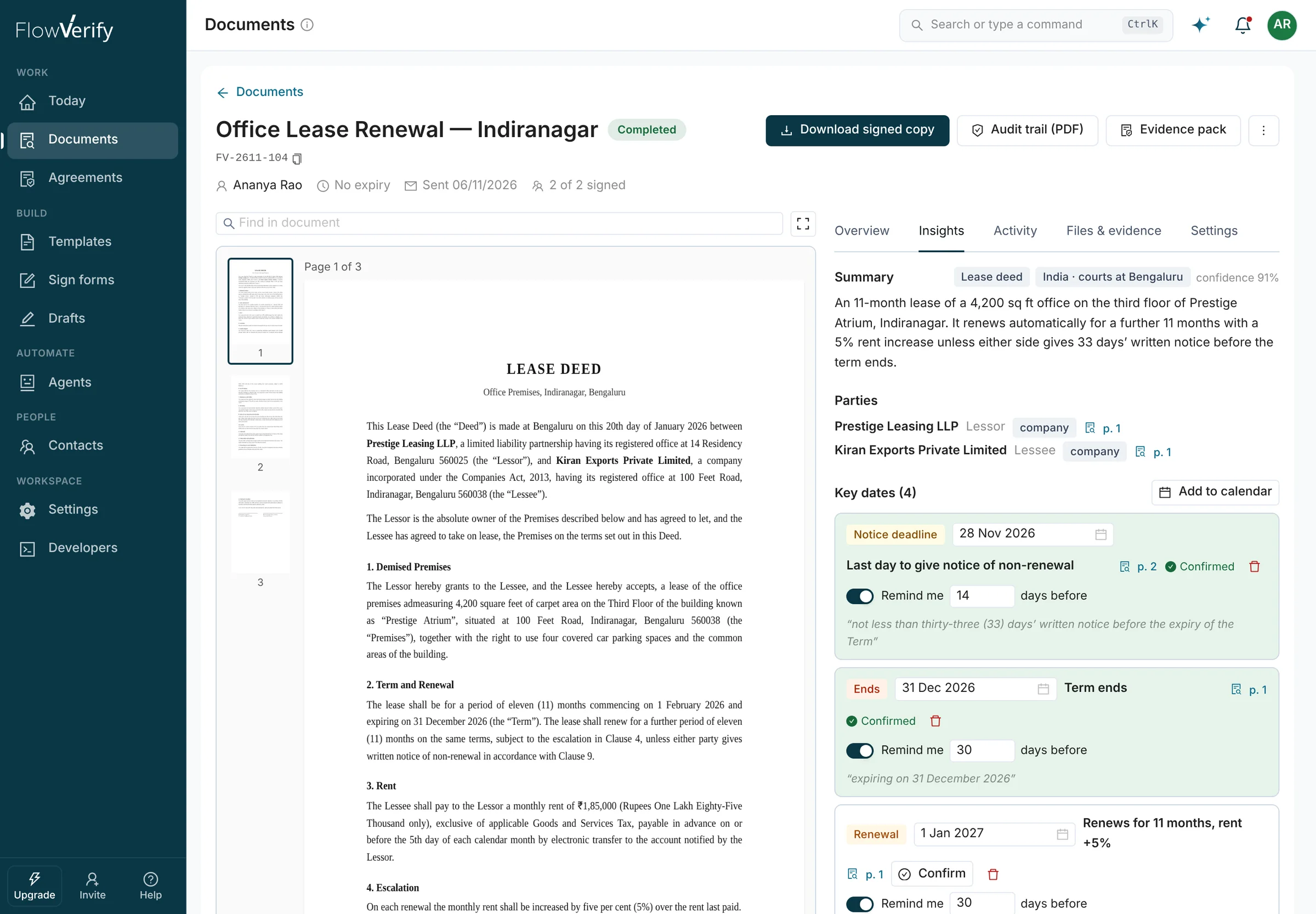
Every signed agreement is read: the parties, the amounts and the dates, each with its page. You are reminded before a renewal or a deadline, so the spreadsheet of renewals can go.
Agreement repositoryConsulting Agreement
FV-2611-106 · Lakshmi Advisory · Completed
- PartiesKiran Exports Pvt LtdLakshmi Advisory LLPp. 1
- Amount₹1,50,000 per monthp. 2
- Starts1 Dec 2026p. 1
- Ends31 May 2027 Reminder 30 days beforep. 1
AI-generated · not legal advice
03Starter agreements
Eight Agreements to Start From
Written for India by FlowVerify, with the fields already placed. A starting point, not legal advice: copy one, adjust its fields and roles, and send.
Mutual NDA
Before you share numbers with a partner or a customer.
Employee NDA
Confidentiality and ownership of work, for every new joiner.
Offer Letter
Role, pay, probation and notice. Accepted by signing.
Internship Letter
Stipend, duration and the mentor, for a campus hire.
Consultant Agreement
For a freelancer or a consultant: the work, the fees and who owns it.
Vendor MSA
One master agreement with a vendor. Each job is a statement of work under it.
Rent Agreement, Karnataka
Eleven months, for a house or a flat, with two witnesses.
Loan Agreement
An unsecured loan with two witnesses: amount, interest and repayment.
04After signing
Three Jobs You Stop Doing
Keeping a spreadsheet of renewal dates, opening old PDFs to find one clause, and putting together proof when somebody questions a signature.
Renewal Dates Without a Spreadsheet
Open a signed agreement and its summary, parties and key dates are already there, each with the page it came from. Confirm a date, choose how many days before it you want a reminder, or add it to your own calendar.
- Notice deadlines, renewals and end dates, read from the agreement
- A reminder before each one, with a lead time you set
- Agreements signed elsewhere can be imported and read the same way
Ask Instead of Opening PDFs
Ask the assistant in plain words. It answers from your own agreements and tells you the document and the page, so you can check it.
AssistantWhole workspaceHow much notice do we owe CoolAir to stop the renewal?
Thirty days’ written notice. The agreement renews automatically on 16 Dec 2026 for another year at ₹2,40,000, so the notice has to reach them by 16 Nov 2026.
Source
AMC Agreement — CoolAir Servicesp. 3
AI-generated · not legal advice
Proof Without Extra Work
Every signed agreement gets a certificate of completion and an audit trail. If it is ever questioned, the evidence pack is one download, and anyone holding the PDF can check it on a public page.
Certificate of Completion
Consulting Agreement — Lakshmi Advisory
FV-2611-106 · Completed
- Shalini BoseSigned in the dashboard9 Nov 2026, 16:12 IST
- R. LakshmiWhatsApp link · OTP11 Nov 2026, 10:22 IST
Signed document hash sha256 · 9f2c41…7be0a3
Scan the QR code to verify
Evidence packZIP
Signed PDF, certificate, audit trail and a manifest
05Before you rely on it
What Your Lawyer or Co-Founder Will Ask
Four short answers for the person who has to be comfortable before the company’s agreements move.
Access
Add your team when you have one. Roles and departments decide who can send and who can only read, and sign-in can require two-factor or single sign-on.
Evidence
Every signed agreement carries a certificate of completion and an audit trail. E-signed contracts are recognised under the Information Technology Act, 2000.
ComplianceAI controls
AI drafting and reading stay off until you accept the AI terms. Each feature has its own switch, India-only processing is available, and your data is not used to train AI by default.
Deployment
Shared cloud, run for you, with AES-256 at rest and TLS in transit. A dedicated single-tenant deployment exists for a company that needs one.
Security
Other teams
The Same Workspace, Used Differently
- HROffer Letters and Joining FormsJoiner listBulk sendSigned
- SalesQuotes and Order FormsTemplateReminders chaseCRM updated
- LegalDrafts, Redlines and EvidenceClausesRedlineEvidence pack
- Finance & ProcurementVendor AgreementsTerms checkedSignedReminder
- Developers & AI TeamsAPI, SDKs and an MCP ServerAPI or MCPMandateWebhook on signed
Contracts signed electronically are recognised under the Information Technology Act, 2000, and Aadhaar eSign is an electronic signature under section 3A. Every completed agreement carries a certificate of completion and an audit trail. A small set of documents named in the Act, such as wills and most powers of attorney, should still be signed on paper.
No. They are a starting point, not legal advice. Copy one into your workspace, adjust its fields and signing roles, and have a lawyer review any agreement that matters before you rely on it. The same holds for a first draft written by AI.
A phone. They open the link from email or WhatsApp, confirm a one-time code or use Aadhaar eSign, and sign in the browser. They do not need a FlowVerify account or an app.
Yes. Import the PDFs and FlowVerify reads them the same way: a summary, the parties, the amounts and the key dates, with reminders before an end, a renewal or a notice date. Imported agreements have no FlowVerify certificate or evidence pack, because they were not signed on FlowVerify.
We take one of your own agreements from a first draft to a signed record with you, show you the dates FlowVerify reads from it, and set up a workspace for your team.
Book a demo
See It on Your
Own Agreements
Bring the agreement you send most often, such as a consultant agreement or a mutual NDA. We draft it with you, you sign it on your phone, and you see the dates it tracks.
What you get
- Your agreement, drafted live
- Signed on your own phone
- A workspace set up for your team