An Agent Can Only Do What Its Mandate Says
Connect Claude, ChatGPT, Cursor or your own agent. An admin issues each one a mandate: which templates, which actions, which recipients, how many sends a day, and until when. The limits are enforced on FlowVerify’s servers, so whatever the app does, it cannot change its mandate, and a request outside it is refused before anything is certified or emailed.
- Refusals name the limit that was met
- An agent never signs for anyone
- Certificate names the agent, mandate and issuer (IT Act, s. 11(c))
Procurement agent
Agent “Claude” · issued by Shalini Bose
- Templates
- Vendor NDA, Purchase Order
- Actions
- Create and prepare draftsSend for signatureRemind signers
- Recipients
- @nandifreight.in, @sundarampack.in · up to 3 per envelope
- Before sending
- Preview required
- Expires
- 31 Mar 2027
20 of 20 sends used today
Daily capCap reachedsend_from_template11:03Purchase Order to Sundaram Packaging
Sent11:20Vendor NDA to Nandi Freight
Sent11:42Purchase Order to Sundaram Packaging
Refusedmandate_limit_exceeded· The daily cap is reached: 20 of 20 sends used. Nothing was sent. The count resets at midnight.
What a mandate holds
The Settings That Decide What an Agent May Do
An admin issues a mandate in the Agents console. It is not a secret and it grants nothing by itself: the agent still needs its API key or its signed-in connection, and the mandate narrows what that may be used for.
Issue mandate
Name
Agent label
API key
Allowed actions
Templates
Sends per day
Recipients
Expiry
Recipient domains
- Agent label
- The name on every audit row the agent causes, and on the certificate of completion: “sent by agent … under mandate …, issued by …”.
- API key
- Bind the mandate to one key, or let any key of the workspace present it.
- Allowed actions
- Create and prepare drafts, send for signature, remind signers, void, download, negotiate. Tick only what the agent needs.
- Templates
- Any template, or only the ones you approve. With an approved list, the agent cannot send a document of its own.
- Sends per day
- A daily cap, counted in your workspace’s time zone and reset at its midnight.
- Recipients per envelope
- The most people any one envelope from this agent may go to.
- Recipient domains
- Every recipient must have an address at one of these domains. Subdomains count.
- Preview first
- Every send, reminder or void through the MCP server must be previewed before it can be confirmed.
- Expiry
- An end date. After it, the mandate answers that it is inactive.
- For negotiations
- Which clauses the agent may negotiate, and how many turns it may take.How negotiation works
The agents console
Issue, Watch and Revoke From One Place
These are real screens from a sample workspace: its mandates, the run log of what their agents did, and the same activity on the Today page.
 Agents console
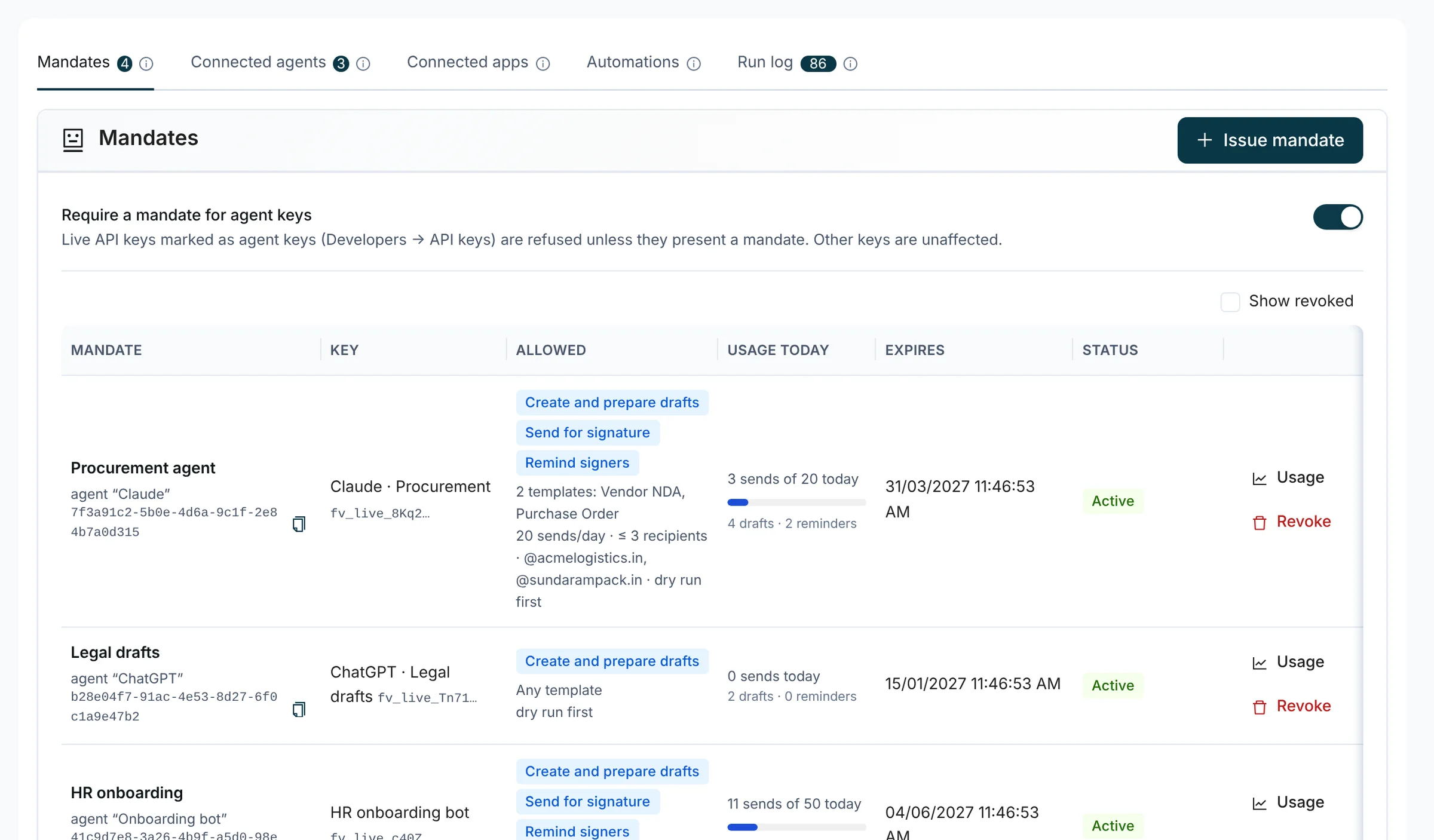
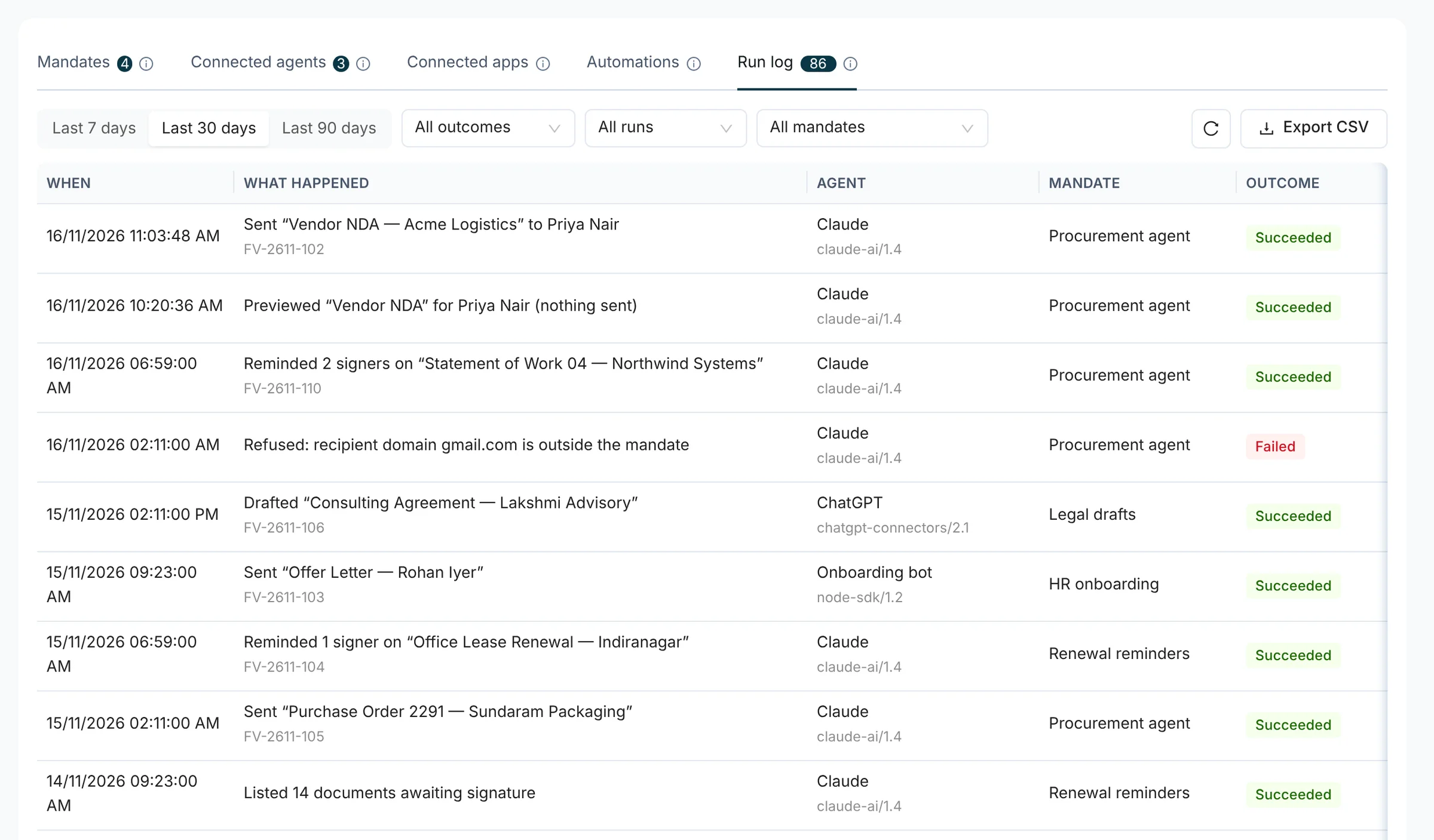
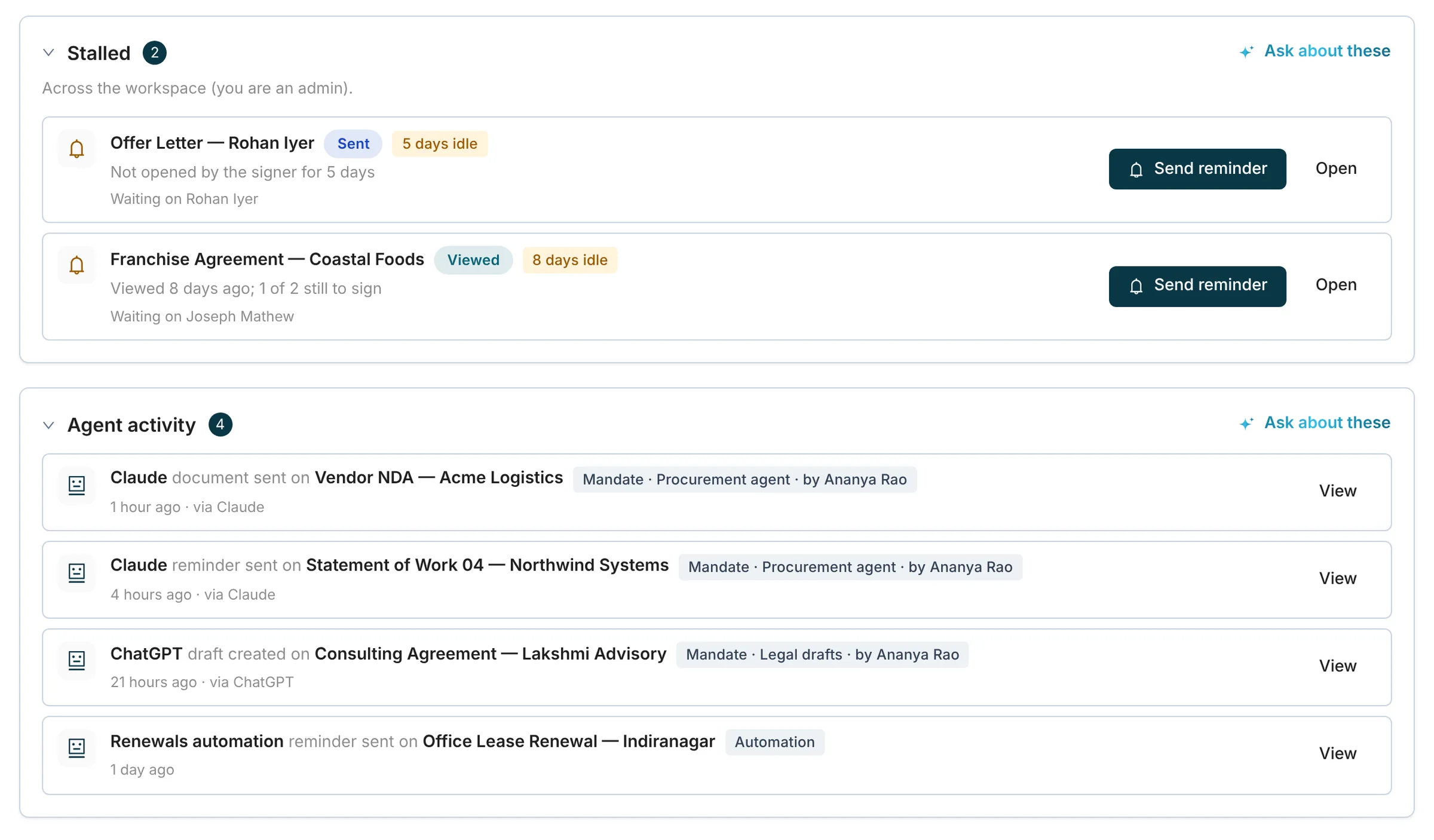
Mandates. Each row is one mandate: the agent, the key it is bound to, what it allows, today’s sends against the cap, its expiry, and the Usage and Revoke actions.
Swipe the screenshot sideways to see every column.
Allowed and refused
The Same Request, Inside and Outside the Mandate
The checks run on FlowVerify’s side, before anything is certified or emailed. An agent cannot widen its own mandate, and a refusal tells it which limit it met.
Inside the mandate
send_from_template- Template
- Vendor NDA
- Recipient
- [email protected]
Action. Send for signature is allowed
Template. Vendor NDA is on the approved list
Recipients. 1 recipient, the limit is 3
Domain. nandifreight.in is on the list
Daily cap. 3 of 20 sends used today
Sent
FV-2611-102 goes to Farah Qureshi and is recorded as sent by agent “Claude” under this mandate.
Outside the mandate
send_from_template- Template
- Vendor NDA
- Recipient
- [email protected]
Action. Send for signature is allowed
Template. Vendor NDA is on the approved list
Recipients. 1 recipient, the limit is 3
Domain. gmail.com is not on the list
Daily cap. Not reached: the request stopped above
Refusedmandate_limit_exceeded
The reply names the limit and the address. Nothing was certified or emailed, and the draft is as it was.
mandate_limit_exceededThe request is outside a limit. The reply names the limit and gives the value the agent needs: the cap and what is used, the allowed domains, the approved templates.
mandate_inactiveThe mandate is revoked, expired or bound to another key. The agent is told to stop and ask an admin.
mandate_requiredThe workspace requires a mandate and this agent key did not present one.
What gets recorded
One Send, Written Down in Four Places
Everything an agent does under a mandate is recorded against the agent and, through the mandate, the person who issued it.
Run Log
Agents → Run log, one entry per request
SucceededSent “Vendor NDA — Nandi Freight” to Farah Qureshi
16/11/2026 11:03:48 AM · FV-2611-102 · Claude, claude-ai/1.4 · Procurement agent
Audit Trail
The document’s Activity tab and its audit trail PDF
16 Nov, 11:03Sent by agent “Claude” under mandate “Procurement agent”, issued by Shalini BoseEvent
Your webhooks
"type": "envelope.sent",
"actor": {
  "type": "agent",
  "agent_label": "Claude",
  "mandate_id": "7f3a91c2-…",
  "issued_by": "Shalini Bose"
}
Certificate of Completion
Vendor NDA — Nandi Freight
- Reference
- FV-2611-102
- Sender
- Kiran Exports Private Limited
- Sent by
- Sent by agent “Claude” under mandate 7f3a91c2-5b0e-4d6a-9c1f-2e84b7a0d315, issued by Shalini Bose.Sent by an automated information system under a mandate issued by Shalini Bose for Kiran Exports Private Limited (Information Technology Act, 2000, section 11(c)).
- Signed by
- Farah Qureshi · Aadhaar eSign · 16 Nov 2026, 11:24
4Printed on the certificate, for anyone who checks it later
Connected apps
Claude and ChatGPT Connect by Signing In
A connector cannot hold an API key, so the person adding it signs in to FlowVerify and decides on a consent screen. The screen names the app, lists each permission, and asks for live or test mode and for the mandate.
- Approving needs the agents permission, and an identity check unless you have just signed in
- Test mode connects an app without real emails or charges
- Disconnect at any time under Agents, Connected apps
- A connection ends when its approver leaves or loses the permission
By default, a connection ends after 30 days without use and after 180 days in any case. The app then asks you to sign in again.

Connect Claude to Kiran Exports?
Published at claude.ai
It will be able to
Mode
Mandate
It cannot sign for anyone, see one-time codes or signing links, or change workspace settings.
Control
Stop an Agent, Check Its Usage, Make Mandates Compulsory
Revoke “Legal drafts”?
Agent “ChatGPT” stops on its next request.
Reason (optional)
The drafting project closed on 15 November.
Revoke With a Reason
Revoking stops the agent on its next request. What it already did stays recorded against the mandate, with your reason on record.
Procurement agent
Today, 16 Nov 2026
Sends
17 left today
3 of 20
- Drafts
- 4
- Reminders
- 2
- Refusals
- 1
Latest runs
- 11:03Sent “Vendor NDA — Nandi Freight” to Farah QureshiSucceeded
- 02:11Refused: recipient domain gmail.com is outside the mandateFailed
See What Each Mandate Used
Sends against the cap, drafts, reminders and refusals, day by day, with the mandate’s latest runs a click away in the run log.
Require a mandate for agent keys
Live API keys marked as agent keys are refused unless they present a mandate. Other keys are unaffected.
An agent key without one getsmandate_required
Require a Mandate for Every Agent Key
Mark a key as an agent key when an agent holds it. With the workspace setting on, a live agent key is refused until it presents a mandate.
The admin. Issues the mandate, watches the usage, revokes
The agent. Prepares, sends, reminds and tracks, inside the mandate
The signer. Reads, verifies with OTP or Aadhaar eSign, and signs
An Agent Never Signs
No mandate can allow it. Signing is always done by the signer, in the signer app.
A first mandate
Start Careful, Then Loosen
A first mandate can be tight. Widen it once the run log shows the agent doing what you expect.
Connect in Test Mode
Use a test key, or choose Test mode when you approve a sign-in. Nothing is emailed, texted or charged, and the agent works only on test documents.
Require a Preview
Tick the preview setting. Every send, reminder or void through the MCP server is then previewed before it can be confirmed.
Keep the Mandate Narrow
One or two templates, your counterparties’ domains, a small daily cap and an expiry date.
Read the Run Log, Then Loosen
When the log shows the agent doing what you expect, issue a wider mandate, with a higher cap or without the preview, and revoke the first.
Related
Where This Connects
- MCP ServerHow Claude, ChatGPT and Cursor reach your workspace, and the tools they get.
- AutomationsRules in plain English, the follow-up agent and agent-to-agent negotiation.
- Developer PlatformAPI keys, scopes, webhooks and test mode for the code and agents you build.
- SecurityHow documents, keys and audit records are protected.
Only the actions an admin ticked: create and prepare drafts, send for signature, remind signers, void, download and negotiate. Each can be narrowed further by approved templates, recipient domains, a recipient limit, a daily send cap and an expiry date. A mandate limits what an agent does. What it can read is decided by the permissions of its API key or connection.
The checks run on FlowVerify’s side, before anything is certified or emailed. A request outside the mandate is refused, and the refusal names the limit that was met. The agent cannot change its own mandate, and each refusal is counted on the mandate’s usage so you can see when an agent keeps reaching a limit.
Those of the person who issued the mandate, acting for your workspace. The certificate of completion states that the agent sent the document under that mandate, as an automated information system acting on the issuer’s instructions. Those are the facts section 11 of the Information Technology Act, 2000 looks to when it attributes an electronic record. Whether a sending binds your organisation depends on the authority behind the mandate.
No. An agent can prepare, send, remind and track. Signing is always done by the signer, in the signer app, with the verification the sender chose. No API call and no agent signs for a third party.
Revoke its mandate. The agent’s next request is refused, and what it already did stays recorded against the mandate, with your reason on record. For Claude or ChatGPT connected by sign-in, you can also disconnect the app under Agents, Connected apps.
No. Mandates are optional, and an API key without one keeps working as before. They are meant for the case where an agent holds the key instead of your own code. A workspace can also require a mandate for every live key marked as an agent key.
Book a demo
See It on Your
Own Agreements
Tell us which agent you want to connect. We issue a mandate with you, run a send inside it and a send outside it, and show you where each one is recorded.
What you get
- A live walkthrough on one of your own agreements
- A workspace set up for your team
- Answers from the people who build it