Describe the Deal. Get a First Draft in Your Approved Wording.
Give FlowVerify the parties, the key terms and a sentence about the deal. It writes a first draft in an editor, inserts clauses from your library word for word, and leaves every fact you did not give as a marked blank.
- Blanks where a fact is missing
- Approved clauses, word for word
- Exports to PDF, ready to send
 DraftsDraft with AI
Consulting agreement with Lakshmi Advisory LLP. Six months from 1 December 2026, ₹1,50,000 a month, Bengaluru courts.
CONSULTING AGREEMENT
This Consulting Agreement is made at Bengaluru on Date of agreement between Kiran Exports Private Limited (the “Company”) and Lakshmi Advisory LLP, having its office at Address of Lakshmi Advisory (the “Consultant”).
3. Fees and Payment
The Company shall pay the Consultant a retainer of ₹1,50,000 per month, exclusive of GST. Invoices are payable within forty-five (45) days of receipt.
01How a draft is built
From a Short Brief to a Draft You Can Edit
The model does not write the page itself. It returns a structured outline, and FlowVerify builds the document from it, so numbering, headings and layout come out the same every time.
- 1
Describe the Deal
Pick the document type and write a sentence or two. Add the parties, say which one you act for, and give the key terms: effective date, term, the city whose courts apply and the notice period.
- 2
The Outline Becomes a Document
The model returns sections and terms as structured data, never a finished page. FlowVerify builds the editor document from that outline, with numbered clause headings.
- 3
Approved Clauses Go in Word for Word
Where a section names a clause from your library, the approved wording is used as it stands, filled with this draft’s parties and terms. The model’s own version of that clause is discarded.
- 4
Indian Defaults Are Added
A stamp line naming the state, governing law and courts, notices, and a signature block with two witnesses arrive as separate sections. Delete any you do not want.
- 5
You Edit, Then Export
The draft opens in an editor with headings, lists and tables, and saves as you type. When it reads right, export it to PDF.
New draftSix-month consulting agreement with Lakshmi Advisory LLP for export compliance advice. Monthly retainer of ₹1,50,000, invoices paid within 45 days.
- Kiran Exports Private LimitedCompanyClientYou act for
- Lakshmi Advisory LLPCompanyConsultant
- Stamp line
- Governing law and courts
- Notices
- Signature block with witnesses
What comes back
A Missing Fact Becomes a Blank, Not a Guess
If the brief did not give an address, a date or an amount, the draft says so with a marked blank. The toolbar counts the blanks and takes you to each one, and export asks before it lets a blank through.
- Each blank is labelled with what belongs there
- Select a blank and type to fill it
- Export lists the blanks that remain, so you can fill them first
This Consulting Agreement is made at Bengaluru on Date of agreement between Kiran Exports Private Limited and Lakshmi Advisory LLP, having its office at Address of Lakshmi Advisory.
9. Notices. Notices to the Consultant are sent to Email for notices and take effect on receipt.
Blank 1 of 3 · Date of agreement
02The editor
The Editor, With a Real Draft Open
A consulting agreement written from a short brief, as it appears in FlowVerify. The numbers mark what the notes describe.
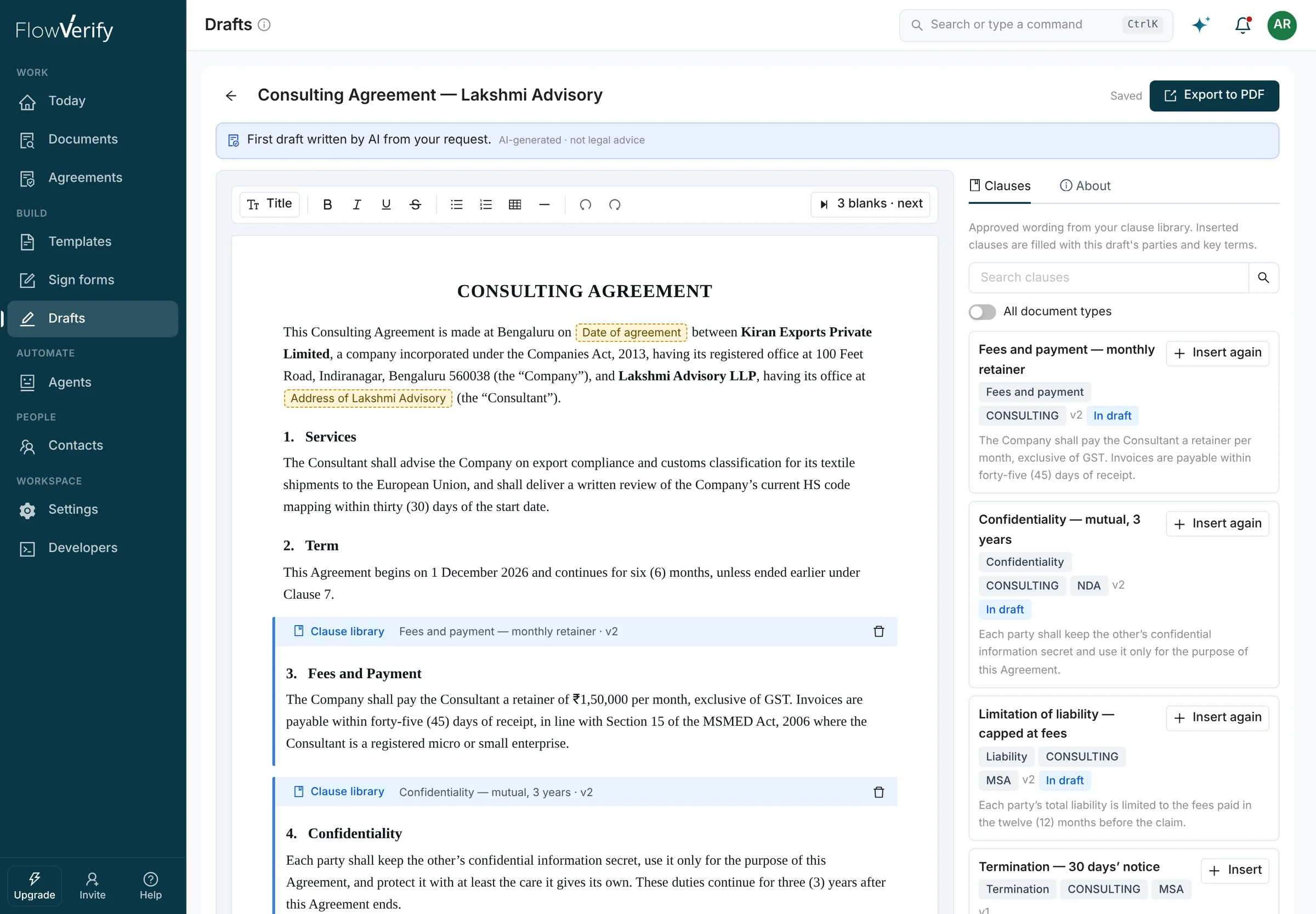
Labelled as an AI Draft
The banner says the first draft was written by AI from your request, and that it is not legal advice.
Marked Blanks
The date of the agreement and the consultant’s address were not in the brief, so each is a labelled blank, not an invented value.
The Blanks Counter
Three blanks are left in this draft. Next selects each one in turn so you can type over it.
A Clause From the Library
The blue strip marks wording inserted from the clause library and names the clause and its version.
The Clause Library Panel
Approved clauses for this document type, with search. In draft marks the ones the document already holds.
Export to PDF
Builds the PDF and opens it in the send wizard as a draft envelope.
03Clause library
One Approved Wording for Each Clause
When a draft needs a liability cap or a confidentiality term, it uses the wording your team approved, word for word, and not a fresh paraphrase each time.
Versions, Document Types and an Approval
Each clause carries its wording, the document types it suits and a version number that goes up with every change. Only approved clauses are offered to a draft.
Limitation of liability, capped at fees
InsertEach party’s total liability is limited to the fees paid in the twelve (12) months before the claim.
- v2Current. The cap is the fees of the last twelve months.
- v1Earlier wording. The cap was the fees of the last six months.
Confidentiality, mutual, 3 years
Termination, 30 days’ notice
Governing law, courts at Bengaluru
It Starts With the Playbook Wording
The library begins with the standard wording behind the four starter playbooks. Drafting and review then work from the same positions.
- NDA
- MSA
- Employment
- Vendor
Filled With This Draft’s Details
Placeholders in a clause take the parties and key terms of the draft it is inserted into. A detail nobody gave becomes a blank.
{{party_a}}Kiran Exports Private Limited{{city}}Bengaluru{{notice_days}}30{{Office address}}Office address
Changing the Library Needs a Permission
Anyone who drafts can insert clauses. Adding, editing and approving them is limited to people who hold the playbooks and clause library permission, which you can grant to a custom role.
- Owner and AdminBuilt-in roles
- Legal operationsCustom role
- SenderBuilt-in role
Ask AI
Select a Passage and Ask for a Rewrite
Select any text in the editor and choose Rewrite, Simpler or Stricter. Stricter means more protective of the party you act for. The answer opens as a proposal beside your own text.
- Replace the selection, insert the proposal below it, or discard it
- Nothing in the draft changes until you choose
- Blanks inside the passage stay blanks
6. Confidentiality
The Consultant shall keep confidential all information disclosed by the Company and shall not use it for any purpose other than the Services. The Company may disclose the terms of this Agreement to its advisers.
Your text
The Consultant shall keep confidential all information disclosed by the Company and shall not use it for any purpose other than the Services.
Proposed
The Consultant shall keep confidential all information disclosed by the Company and shall not use it for any purpose other than the Services. These duties continue for three (3) years after this Agreement ends.
Your instruction: “Say that the duty continues for three years after the agreement ends.”
05Rules and context
Say It Once. Every Draft Follows It.
A rule is something to do or avoid. Context is a fact about your business. Each person keeps their own, and an admin can set them for the whole workspace.
- Apply a rule to drafting, to review, or to both
- Tell the AI “always use Bengaluru courts” and it is saved as a rule, marked with where it came from
- Switch a rule off without deleting it, or remove it
Nothing is sent to a model until a workspace admin accepts the AI terms. India-only processing is available, and your data is not used to train AI by default.
Rules and context for AI
DraftsEither party may end the agreement with 30 days’ written notice.
Rules (3)
Indian law governs; disputes go to the courts of Bengaluru.
Whole workspaceDrafting and reviewPayment is due within 30 days of a valid invoice.
Whole workspaceDrafting and reviewNever include exclusivity.
Only meDrafting onlyFrom a draft request
Context (2)
We are Kiran Exports Private Limited, registered in Bengaluru.
Whole workspaceDrafting and reviewWe are registered as an MSME.
Whole workspaceDrafting and review
06Templates
Agreements You Send Often Become Templates
Not every agreement needs drafting. Start from one written for India, or turn your own form into a template that keeps its fields from one version to the next.
01
Eight Starter Agreements for India
Each one is a starting point, not legal advice, and says so on its card. Pick one and FlowVerify copies it into your workspace as an ordinary template, with fields already placed where the blanks are printed.
- Mutual NDA
- Offer letter
- Residential rent agreementKarnataka · 11 months
- Vendor MSA
- Consultant agreement
- Employee confidentiality and IP agreement
- Internship letter
- Unsecured loan agreement
02
Placeholders Become Variables
FlowVerify reads an uploaded template and finds placeholders written as {{ name }}, [NAME] or Label: ____. Each becomes a variable you can place as a field, or fill through the API when you send.
This Agreement is made on [EFFECTIVE DATE] between {{ vendor_name }} and Kiran Exports Private Limited.
Either party may end this Agreement by written notice. Notice period: ____
Variables found (3)
vendor_nameField placedeffective_dateField placednotice_periodSigner fills in
03
A New Version Shows What Changed
Upload a revised file and the template keeps its roles and fields. You get a word-level comparison with the previous version and a one-paragraph summary of what changed.
Payment moves from sixty to forty-five days and the notice period from thirty to sixty days. No other clause changed.
AI-generated · not legal adviceWhat changed
- … invoices are payable within
sixty (60)forty-five (45) days of receipt … - … on
thirty (30)sixty (60) days’ written notice …
Roles and fields carried over from v2
04
Three Uploads of the Same Form
When you have uploaded the same form three times within 90 days, the send wizard offers to make it a template and suggests where the fields go.
This looks like the same form you have uploaded 2 times before.
Create a template and FlowVerify suggests where the fields go.
Export
From the Editor to the Send Wizard in One Step
Export turns the draft into a PDF and opens it in the send wizard as a draft envelope, ready for recipients and fields. Run a playbook review on that document and the findings you accept come back into the editor as suggested edits you apply in place.
- Exporting again replaces the PDF in the same draft envelope while no fields are placed on it
- Each suggested edit shows the old and the new wording before you apply it
- Export
- Send wizard
- Review
- Suggested edits
Exported to PDF
Consulting Agreement — Lakshmi Advisory
3 pagesFV-2611-118Draft
Suggested edits
2 from playbook reviewPayment terms
High… payable within
sixty (60)forty-five (45) days of receipt …ShowApply- Apply
Limitation of liability
Missing clause
AI-generated · not legal advice
Keep Reading
- Next stepPlaybook ReviewCheck the draft, or the other side’s paper, against your positions. Every finding quotes the document and cites the page.Read more
- ThenSend for SignatureThe exported PDF opens in the send wizard. Add recipients, let FlowVerify place the fields, and send.Read more
- AI & AgentsAssistantAttach a document in the assistant and ask it to draft a new agreement from it, or ask what your signed agreements say.Read more
- For legal teamsLegalDrafts from approved clauses, review with redlines, a searchable repository and an evidence record ready to produce.Read more
Treat it as a first draft. Every AI draft is labelled AI-generated, not legal advice. Clauses from your library are inserted word for word, facts you did not give are left as marked blanks, and nothing leaves the editor until a person exports the draft and sends it. Have the people who normally approve your agreements read it first.
It becomes a marked blank with a label, for example Date of agreement. FlowVerify does not fill the gap with a guess. The toolbar shows how many blanks are left and moves to the next one, and export lists any that remain so you can fill them first.
From your clause library. It starts with the standard wording behind the four starter playbooks (NDA, MSA, employment and vendor) and your team edits it from there. Every change to a clause makes a new version, and only approved clauses are offered to a draft. Adding, editing and approving clauses needs the playbooks and clause library permission.
Nothing is sent to a model until a workspace admin accepts the AI terms. Each AI feature has its own switch, India-only processing is available, and your data is not used to train AI by default. Aadhaar numbers, PANs, bank details, email addresses and phone numbers in a brief are replaced with placeholders before the text reaches the model.
No. The eight starter agreements are written for India as a starting point, not legal advice, and every card in the library says so. A copy becomes an ordinary template in your workspace with its fields already placed. Have it reviewed for your own situation before you rely on it.
Yes. Start a blank draft, or build one from clauses in your library, and use the same editor, the same blanks, the Indian default sections and the same export to PDF.
Book a demo
See a First Draft of
Your Own Agreement
Bring an agreement you write often. We draft it with you from a short brief, check it against a playbook and send it for signature, live.
What you get
- A live walkthrough on one of your own agreements
- A workspace set up for your team
- Answers from the people who build it