Out in About a Minute. Followed Up Until It Is Signed.
Add the document and the people, let FlowVerify place the fields, and send. Each signer gets the link on the channel they answer, and a follow-up agent plans the reminders around them.
- Email, SMS and WhatsApp
- OTP, Aadhaar eSign or digital certificate
- Signers need no account
 Vendor NDAFV-2611-102
- 1Approves first
Karthik
ApproverEmail
- 2Waiting
Farah Qureshi
Signer · Aadhaar eSignEmailWhatsApp
- 3When signed
Shalini Bose
Gets a copyEmail
- Sent10:51
- Viewed11:20
- Signed11:24
Farah Qureshi · 13 Nov 2026
Made for India first

IT Act, 2000
E-signed contracts recognised
Aadhaar eSign
OTP on the linked mobile
BSA 2023, s.63(4)
Pre-filled certificate in every evidence pack

AES-256 & TLS
Encrypted at rest and in transit
01The send wizard
Four Steps From a File to a Sent Envelope
The wizard asks for the documents, the people, the fields and a last look. Start from a template and the first three arrive filled in, which is how an agreement goes out in about a minute.
- 01
Add Documents
Upload a PDF or Word file, pick a template, or continue from a draft. Several files travel together as one envelope.
- 02
Add Recipients
Signers, approvers and people who only get a copy. Set the signing order, the channels for each person and how each one verifies.
- 03
Prepare Fields
Signature, initials, date, name, text, checkbox and more. Tick “Place the fields for me”, or quote the words a field belongs beside.
- 04
Review and Send
The pre-send check runs, you read the summary and the message, and send. From then on every recipient is tracked.
Step 03 on a real screen, with a lease deed open:
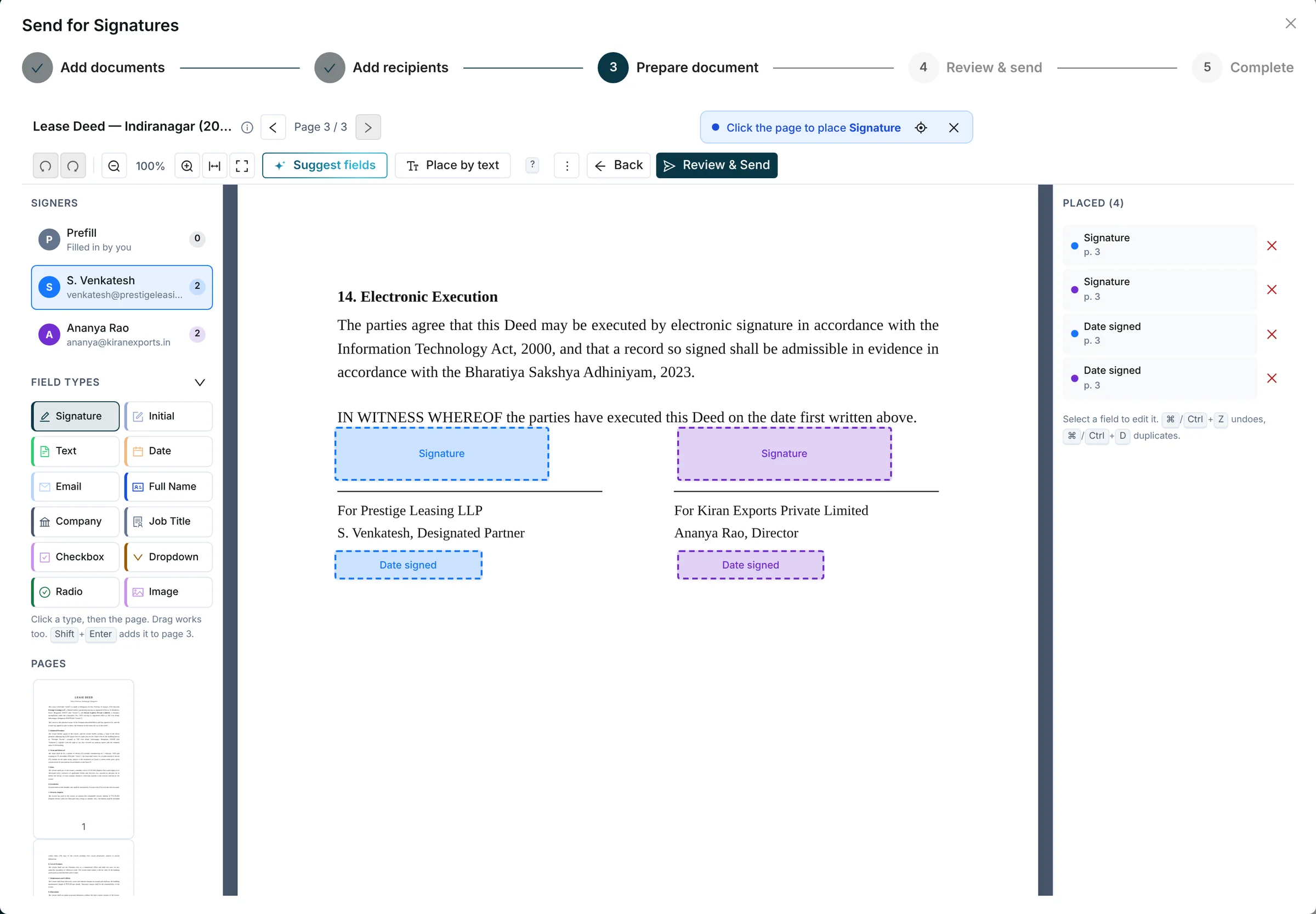
Where You Are
Documents and recipients are done. This is step three of the wizard, Prepare document.
Signers, Each With a Colour
Pick a signer, then place their fields. The number beside each name counts the fields they have.
Suggest Fields
FlowVerify reads the page and proposes fields beside signature lines, dates and names, each assigned to a signer. Accept, move or reject them.
Place by Text
Type a phrase printed on the page, such as “Authorised Signatory”, and drop a field beside it.
Fields on the Page
Blue belongs to S. Venkatesh, purple to Shalini Bose. Select several at once, snap them to alignment guides and nudge them with the arrow keys.
Placed Fields and Undo
Every placed field is listed with its page, and undo goes back up to 50 steps.
02Templates, bulk send, sign forms
Prepare It Once, Send It Many Times
A template holds the document, the roles and the fields. From there one send can go to a whole list, or become a link that anyone can open and sign.
Templates With Roles and Variables
Fields belong to roles, not to named people. When you use the template you name the person for each role and fill the variables, in the wizard or through the API.
Roles
- Company signatorySignature · Date · Designation
- Vendor signatorySignature · Date · Full name
Variables
vendor_nameeffective_datecity
Filled when you send, in the wizard or through the API.
Sign Forms With a Link and a QR Code
Publish a form once and share its link, or print the page with its QR code. Anyone who opens it fills in their details and signs.

Visitor NDA
signer.flowverify.co
The QR code here is real. Scan it and it opens our demo page.
Bulk Send From a List
Upload a list of names and email addresses, with phone numbers for the people who should also hear on WhatsApp. Each person gets their own envelope and their own audit trail.
Bulk send · Offer Letter
joiners-nov.csv- FV-2611-141Sent
Rohan Iyer
Email · WhatsApp
- FV-2611-142Sent
Sneha Kulkarni
Email
- FV-2611-143Sent
Arjun Menon
Email · WhatsApp
3 people, 3 envelopes, 3 audit trails
The Order People Sign In
Send to everyone at once or one after another. Put approvers ahead of signers, add people who only get the signed copy, and let a signer pass the document to the right person.
- 1KarthikApprover
- 2Farah QureshiSigner
- 3Shalini BoseSigner
- AccountsGets a copy
Channels
Reach Each Signer Where They Reply
For each recipient you choose the channels: email, SMS and WhatsApp. The signing link, the one-time code, reminders and the completion notice all follow that choice.
- Email always goes out and remains the record
- On WhatsApp only links travel, never the document
- A signer can reply STATUS to ask where things stand, or STOP to opt out
Farah Qureshi
Signer · Nandi Freight · +91 98451 •••••
- From
- Kiran Exports Private Limited · [email protected]
- Subject
- Vendor NDA for your signature
Verified sender
Hi Farah, the vendor NDA we discussed is ready for your signature. It covers the Chennai warehouse engagement. Please review and sign it by Friday, 20 November.
Regards, Shalini Bose
Review and signEmail always goes out and is the record. SMS and WhatsApp are switched on for each recipient.
Write with AI
Invites and Reminders in the Signer’s Language
Write with AI drafts the invite or the reminder for each recipient in English, Hindi, Kannada, Tamil, Telugu or Marathi, in the tone your workspace has set.
- The draft never contains a link or a code. The email adds the signing link.
- You edit the text before it is used
- Save a reminder draft and automatic reminders reuse it
Write with AI
Language
- English
- Hindi
- Kannada
- Tamil
- Telugu
- Marathi
Tone and sign-off come from the workspace’s message voice. The draft knows what the document is about.
नमस्ते प्रिया जी,
हम आपको याद दिलाना चाहते हैं कि गोपनीयता समझौता (Vendor NDA) अभी आपके हस्ताक्षर की प्रतीक्षा में है। कृपया इसे पढ़कर शुक्रवार, 20 नवंबर तक हस्ताक्षर कर दें।
सादर,
किरण एक्सपोर्ट्स प्राइवेट लिमिटेड
In English: Hello Farah, a reminder that the confidentiality agreement (Vendor NDA) is still waiting for your signature. Please read it and sign by Friday, 20 November. Regards, Kiran Exports Private Limited.
04Follow-up agent
Reminders Timed Around Each Signer
Switch the follow-up agent on for one document or for the whole workspace. It times each reminder for the hour that person usually opens mail, keeps out of quiet hours, and moves from email to SMS to WhatsApp if nothing happens.
Offer Letter · Rohan Iyer
Follow-up on · deadline 30 Nov 2026
- 09:00, when Rohan usually opens mail
- Quiet hours 21:00 to 08:00
- Cap of 5 reminders
Sent
16 Nov, 10:05
Email
Reminder 1
19 Nov, 09:00
Email
Reminder 2
22 Nov, 09:00
Email
Reminder 3
25 Nov, 09:00
SMS
Reminder 4
28 Nov, 09:00
WhatsApp
Signed
28 Nov, 09:12
Reminders stop
It never sends more reminders than the cap, never inside quiet hours and never after the deadline, and it stops as soon as the person signs or declines.
Today · Stalled
Franchise Agreement · Coastal Foods
Opened but not signed for 3 days
Send reminderIt Says Why a Document Stalled
The Today page lists stalled documents with the reason: not opened, opened but not signed, stuck on the one-time code, waiting on an approver.
Daily digest · 09:00
3 documents are waiting on signers
- Offer Letter · Rohan IyerNot opened
- Franchise Agreement · Coastal FoodsOpened, not signed
- Statement of Work 04 · Northwind SystemsNot opened
A Daily Digest for Senders
Each sender with documents waiting gets one email a day that lists them and why they are stuck.
Recipients
- Farah QureshiSigned
- Rohan IyerViewed
- S. VenkateshSent
- Vega Traders signatoryDeclined
Every Recipient Tracked
Sent, viewed, signed or declined, for each person on the envelope, with the time of each step.
05The signer’s side
The Sender Decides How Each Person Signs
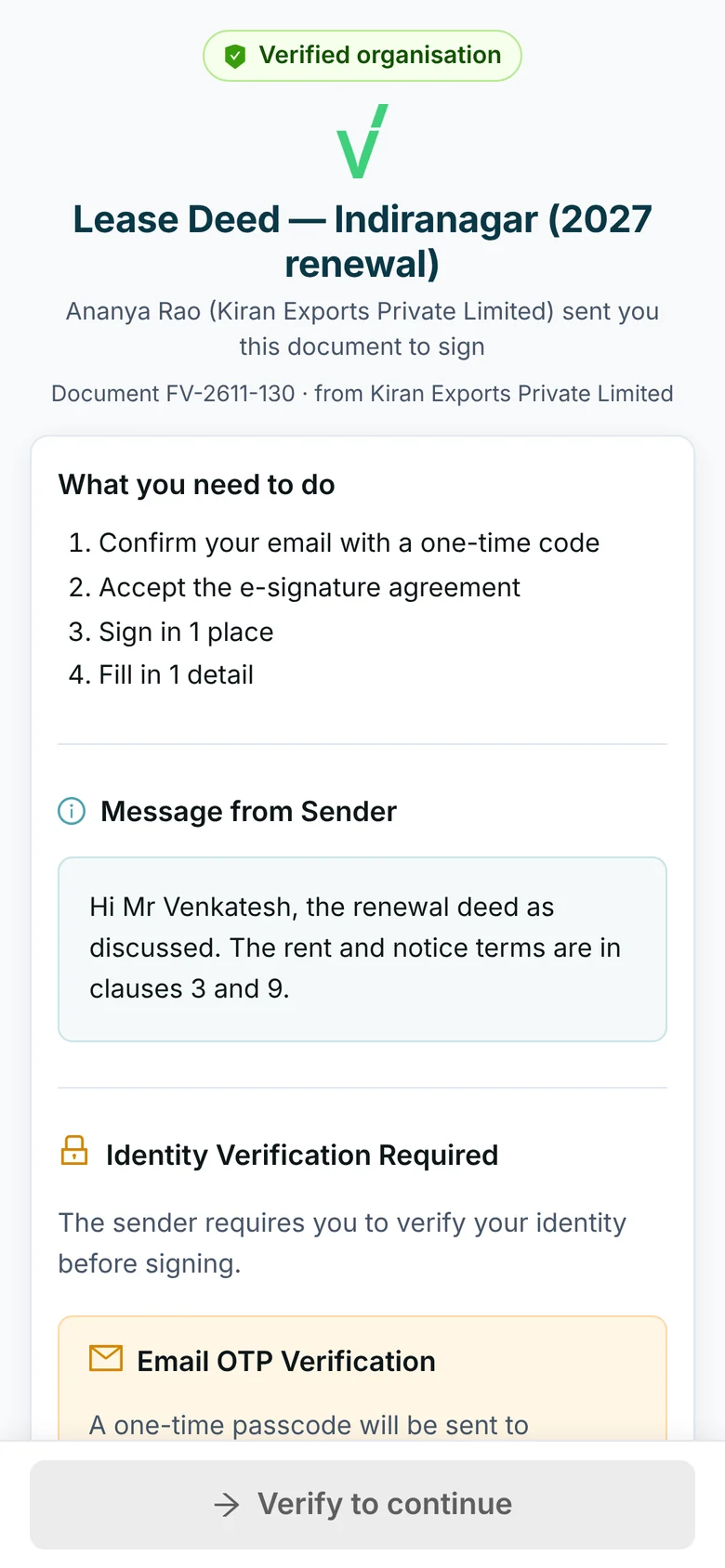
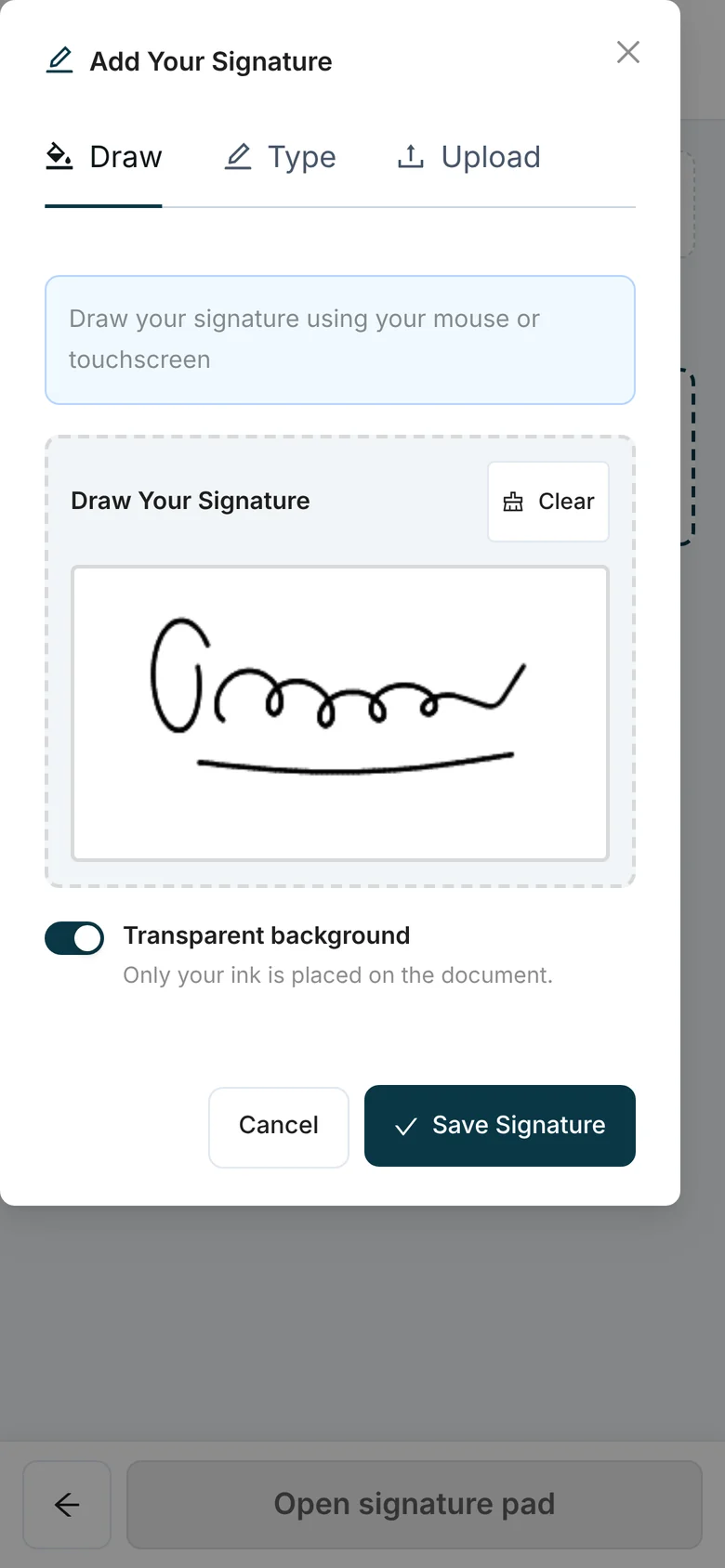
Match the check to what is at stake. The signer needs no account and no app. They open the link, verify and sign on any device.
Email or SMS One-Time Code
The signer confirms a code sent to their email address or phone before the document opens.
Aadhaar eSign
The signer authenticates with an OTP on the mobile number linked to their Aadhaar. The signature is issued through a licensed Certifying Authority. FlowVerify never asks for or stores the signer’s Aadhaar number; it is entered on the eSign provider’s page.
A Digital Certificate
Sign with your organisation’s own digital signature certificate when a regulator or a counterparty asks for one.
Sign Yourself, or Inside the Dashboard
Sign a document yourself without sending it to anyone. When you are a recipient and already signed in, sign from the dashboard with the same checks as the emailed link.
A Verified Sender
Send signer email from your own domain. Signers see a Verified organisation badge once FlowVerify has confirmed your GST or Udyam registration and your control of the domain.
06Without the dashboard
Start From an Email or a Slack Message
Not every send starts in the dashboard. Forward the document to your personal send address, or type a command in Slack. FlowVerify prepares the draft and asks you to confirm.
Forward an Email With the Attachment
Each person has their own send address. Say who signs, who gets a copy and the due date at the top of the email. Mail that does not come from your own sign-in address is dropped.
- To
- send+k7m2qx9d…@inbound.flowverify.co
- Subject
- Fwd: Purchase Order 0412
FlowVerify
by emailYour draft is ready to review
Purchase Order 0412 · 1 signer · 2 fields placed · due 25 Nov
Type a Command in Slack
Point /flowverify send at a file and name the signer. FlowVerify acts as you, with your permissions, and answers in a direct message.

# procurement
Shalini Bose 10:12
/flowverify send PO-0412.pdf to Meera [email protected] due 25 Nov
The file is a Slack file link or a Google Drive link. There is also a Send for signature shortcut on any message with a file, and /flowverify status to see where a document stands.
FlowVerify
in a direct messageYour draft is ready to review
Purchase Order 0412 · 1 signer · 2 fields placed · due 25 Nov
Nothing goes out until you confirm. The link opens the wizard’s Review step, with the fields placed and the pre-send check already run. The one exception is a send address linked to an agent mandate that allows sending, and it stays inside the mandate’s limits.
07Before it goes out
Checked, and Stamped if It Needs to Be
Two things can happen at the Review step before any signer hears from you.
A Pre-Send Check on Every Send
A fixed set of rules, with no AI, looks for a signer without a field, an invalid email address or phone number, a deadline in the past, and documents Indian law treats differently, such as a lease for more than a year, which has to be registered. Admins choose which rules stop a send.
Pre-send check
No blockers- Every signer has a field to sign
- Email addresses and phone numbers are valid
- The deadline has not passed
- No instrument excluded by the IT Act found in the text
e-Stamp Certificate, Ordered When You Send
See the stamp-duty estimate for the state and the document type, and add an e-stamp to the draft. The duty is paid from a prepaid stamp wallet when you send, and the certificate pages are attached in front of the document before anyone signs.
Add e-stamp
Lease Deed — Indiranagar (2027 renewal)Stamp duty
₹500
The amount on the e-stamp certificate is what you pay. The duty itself is set by the state’s stamp law.
Keep Reading
- Before sendingPlaybook ReviewCheck the wording against your positions, then let the pre-send check look over the envelope.Read more
- After signingEvidence & VerificationCertificate, audit trail and a public check.Read more
- ProductAadhaar eSignAadhaar OTP signing, recognised under the IT Act.Read more
- ProductIdentity VerificationPAN, DigiLocker and face match before signing.Read more
- For HROffer Letters in BulkJoining forms sent from a list, signed on a phone.Read more
- For SalesQuotes and Order FormsOut from a template, with reminders that follow up.Read more
Contracts signed electronically are recognised under the Information Technology Act, 2000. Aadhaar eSign and signing with a digital signature certificate are electronic signatures as the Act defines them; an OTP signature is backed by the certificate of completion and the audit trail. The Act does not apply to wills, trust deeds, most powers of attorney and negotiable instruments other than cheques. The pre-send check looks for those before you send.
No. They open the link they receive by email, SMS or WhatsApp, verify with a one-time code or Aadhaar eSign, and sign on any device.
No. WhatsApp carries the signing link, the one-time code, reminders and the completion notice. The document stays behind the link, and email remains the record for every recipient. A signer can reply STOP to opt out of WhatsApp messages.
The follow-up agent works to a cap and to quiet hours. It never sends more reminders than the number you set, never sends inside quiet hours, never after the deadline, and stops as soon as the person signs or declines. You switch it on for one document or as the workspace default, and manual reminders still work.
FlowVerify prepares a draft and sends you a single-use link, valid for 24 hours, that opens the wizard’s Review step. Nothing is sent until you confirm there. The one exception is a send address linked to an agent mandate that allows sending; the mandate’s limits and the pre-send check still apply. Mail that does not come from your own sign-in address is dropped.
The figure in the wizard is an estimate from FlowVerify’s stamp tables for the state and document type. When the e-stamp is ordered, the amount on the e-stamp certificate is what you pay. If it differs from the estimate, sending stops until you accept the new figure, and nothing is charged before that. The duty itself is set by the state’s stamp law, so check the figure for unusual documents.
Book a demo
See It on Your
Own Agreements
Bring one agreement you send often. We send it to your phone, you sign it with a one-time code or Aadhaar eSign, and we open the signed record together.
What you get
- A live walkthrough on one of your own agreements
- A workspace set up for your team
- Answers from the people who build it