Vendor Terms Checked Before You Sign. Renewal Dates Tracked After.
The pre-send check flags payment terms beyond 45 days for a micro or small enterprise supplier and cites the section. After signing, FlowVerify reads the amounts, renewal dates and notice windows from the agreement and reminds you before each one.
- MSMED Act, 2006, s.15 flagged
- Stamp duty estimate by state
- Every date cited to its page
 Vendor Agreement — Sundaram Packaging
Pre-send check
Clause 6 · Payment within 60 days of acceptance
Sundaram Packaging is a small enterprise. Payment is due within 45 days of acceptance.
MSMED Act, 2006 · s.15
Dates read from the signed agreement
Reminders on
- Starts1 Dec 2026Supply beginsp. 1
- Price review1 Jun 2027Rates may be revisedp. 3
- Notice1 Sep 2027Last day to give 90 days’ noticep. 4
- Renewal30 Nov 2027Renews for 12 monthsp. 4
01The renewals spreadsheet
A Spreadsheet Knows Only What Someone Typed Into It
The dates that cost money are inside the agreements: when one renews, how much notice it needs, when the price can change. They reach the spreadsheet only if somebody reads the PDF and types them in.
Vendor contracts.xlsx
Last edited 14 Aug by Karthik
| Vendor | Renewal | Notice | Owner |
|---|---|---|---|
| CoolAir Services | Dec? | 30 days (check) | Karthik |
| Zenlytics | auto-renews | — | — |
| Prestige Leasing | 31-12-2026 | 33 days?? | Shalini |
| Northwind Systems | Sep 2028 | ask Sales | — |
Comment on B2: “can someone confirm with the vendor?”
Key dates, next 30 days
Read from the signed agreements
- Notice deadline16 Nov 2026p. 3
AMC Agreement — CoolAir Services
Renews 16 Dec 2026 at ₹2,40,000
- Price review25 Nov 2026p. 4
Software Subscription — Zenlytics
Fee may rise by up to 8%
- Notice deadline28 Nov 2026p. 2
Office Lease Renewal — Indiranagar
Term ends 31 Dec 2026
Read, Not Typed
Amounts, start and end dates, renewals, price reviews and notice deadlines are read from the signed PDF itself.
Cited to the Page
Each date and amount names its page. One that cannot be tied to a page is dropped, not shown.
Yours to Correct
Edit a date, confirm it or dismiss it. Your changes are kept when the agreement is read again.
02How it works
From Purchase Request to Tracked Obligation
Five steps, before and after the signature. Each one links to the page that covers it.
- Terms checked
- Signed
- Reminder
- 01
Start From Your Own Paper
Vendor agreements, purchase orders and rate contracts go out from templates. The vendor’s name, the rate, the payment days and the start date are variables, filled in when you send.
Templates and variables- Vendor Agreementv4 · 2 roles · 6 variables
- Purchase Orderv2 · 1 role · 8 variables
- Rate Contractv3 · 2 roles · 5 variables
Filled for this vendor
- vendor_name
- Sundaram Packaging
- rate_per_unit
- ₹18.50
- payment_days
- 45
- start_date
- 1 Dec 2026
- 02
Payment Terms Are Checked Before Sending
If a party is a micro or small enterprise and the document gives more than 45 days to pay them, the pre-send check flags it and cites section 15 of the MSMED Act, 2006. An admin decides whether that blocks the send or only warns.
Checks before sendingPre-send check
Vendor Agreement — Sundaram Packaging
1 blockerPayment terms exceed 45 days for a micro or small enterprise
Clause 6 gives 60 days to pay; section 15 allows at most 45 days from acceptance. The contact for Sundaram Packaging is marked as a small enterprise.
MSMED Act, 2006 · s.15Fix in the document- Every signer has a field to sign
- Approver set by the approval policy
- Deadline is in the future
- 03
Stamp Duty Is Estimated, and an e-Stamp Certificate Ordered
See a stamp duty estimate for the state and the document type. Where the table cannot give a figure, FlowVerify says so and asks you to check. Order an e-stamp certificate at Send: the duty is paid at cost from your prepaid stamp wallet, and the certificate goes in front of the document before anyone signs.
e-Stamp at SendStamp duty
Lease Deed — Peenya Warehouse, Bengaluru
Estimate, verify- State
- Karnataka
- Document type
- Lease deed
- Rent
- ₹50,000 per month
- Term
- 3 years
Estimated duty
₹6,000
Stamp wallet ₹25,000 · held at Send
- 04
Approvers First, Then Signers
Add the people who must approve before the vendor sees the document, or let your approval policy add them. Each signer then gets their turn in order, and you can see whose turn it is.
Signing order and approversRouting order
Vendor Agreement — Sundaram Packaging
CompletedShalini Bose Approver
Kiran Exports · Director
ApprovedTue 10:12Karthik Signer
Kiran Exports · Procurement head
SignedTue 10:40R. Sundaram Signer
Sundaram Packaging · Partner
SignedWed 09:05
- 05
After Signing, the Dates Track Themselves
FlowVerify reads the signed agreement: the value, the price review, the notice window and the renewal date, each with its page. They go on the obligations calendar with reminders, and export to your own calendar.
Agreement repositoryVendor Agreement — Sundaram Packaging
FV-2611-131 · Insights
Add to calendar- Value₹6,12,500Order value for the first yearp. 1
- Price review1 Jun 2027Rates may be revisedRemind 30 days beforep. 3
- Notice1 Sep 2027Last day to give 90 days’ noticeRemind 7 days beforep. 4
- Renewal30 Nov 2027Renews for 12 monthsRemind 30 days beforep. 4
03The paperwork
The Agreements Finance and Procurement Hold
Whatever commits the company to pay, to renew or to give notice. Each goes out from a template and comes back to one repository.
Vendor Agreement
Payment terms are checked for micro and small enterprise suppliers before it is sent.
Pre-send checkPurchase Order
From a template with the values filled in, approved before the vendor signs.
Rate Contract
The price review date is read from it and put on the calendar.
AMC Agreement
The renewal and its notice window are tracked, with a reminder before the window closes.
ReminderSoftware Subscription
The renewal date and any price rise clause, each cited to its page.
Lease Deed
A stamp duty estimate for the state, and Aadhaar eSign for the signatures.
e-StampVendor NDA
Sent before the first quote, by a person or by your procurement agent under a mandate.
Statement of Work
Milestone payment dates go on the obligations calendar.
Loan Agreement
A starter template written for India, signed with Aadhaar eSign.
Starter template
04Obligations calendar
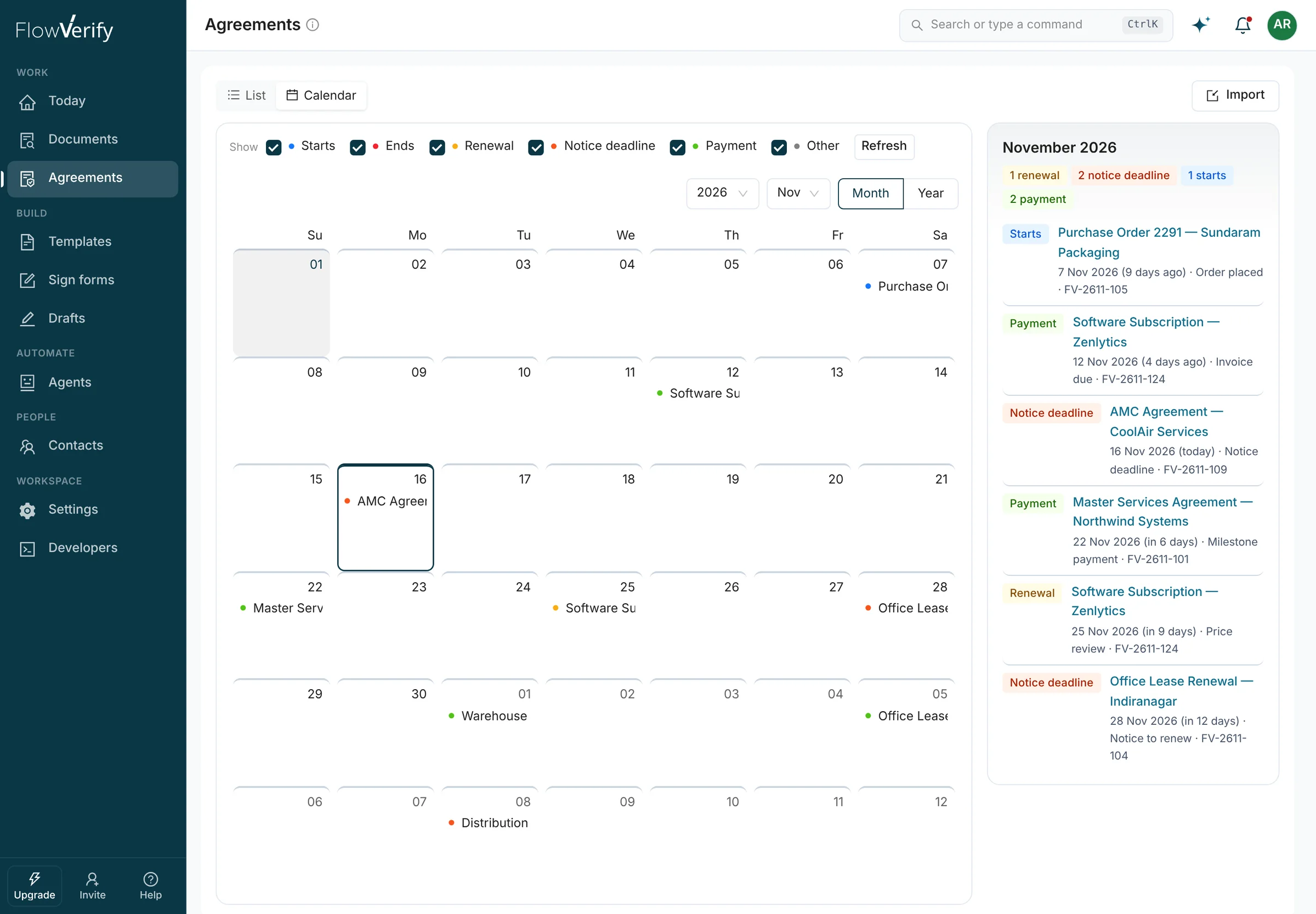
A Calendar Built From What You Signed
Starts, ends, renewals, notice deadlines and payments from every signed or imported agreement, on one calendar, with the month’s list beside it.
- A reminder before each date, with a lead time you set
- One agreement’s dates export to your own calendar
- Agreements signed elsewhere can be imported, and their dates join in
- The repository exports as CSV when an auditor asks
05Assistant
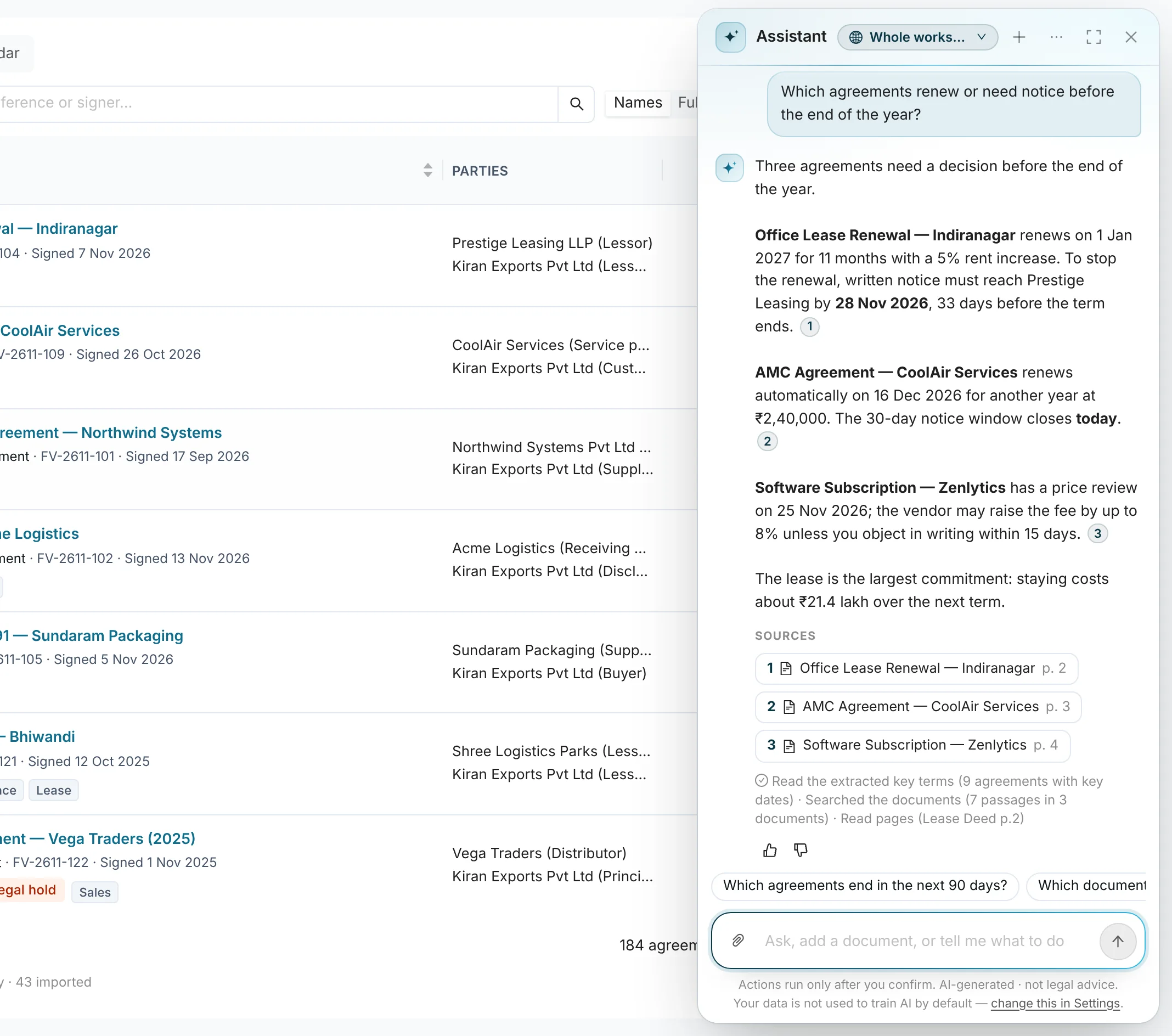
Ask Which Agreements Need a Decision
Ask in plain words. The assistant answers from your signed and imported agreements and names the document and page behind each point, so you can check it before you act on it.
- Which agreements renew or need notice before the end of the year?
- Which agreements end in the next 90 days?
- Find contracts with a 90-day notice period
- Every answer cites the document and the page
- Actions run only after you confirm them
- Your data is not used to train AI by default
06Connected
Connected to Your Books and Your Team Channel
A signed agreement is only useful where the work happens: next to the ledger entry, and in the channel where procurement talks.
Zoho Books and Tally
Send an estimate or a contract for signature from Zoho Books, and keep the signed agreement with the ledger or voucher it belongs to in Tally.
 Connected
Zoho Books
Send estimates and contracts for signature
 Connected
Tally
Attach signed agreements to ledgers and vouchers
A Rule Written as a Sentence
Write the rule in plain English. FlowVerify turns it into steps you can read back, and you test it on a real document before you switch it on.
You write
“When a vendor agreement is signed, post it in #procurement.”
FlowVerify reads it back
 Post to #procurement
Tested on FV-2611-102 · switched on
07Before you roll it out
What Audit and IT Will Ask
Short answers to the questions that come up when agreements and their dates move out of a shared drive.
Access
Built-in roles include Approver, Billing and a read-only Auditor, with custom permissions and departments on top. Single sign-on and two-factor.
Evidence
A certificate of completion and an audit trail for every agreement, and an audit log that exports as CSV for a date range.
Evidence and verificationAI controls
Reading dates from agreements is an AI feature with its own switch. It runs only after an admin accepts the AI terms, and India-only processing is available. The payment-terms check uses fixed rules and no model.
Deployment
Shared cloud, or a dedicated single-tenant deployment. AES-256 at rest and TLS in transit.
Security
Other teams
The Same Workspace, Used Differently
- HROffer Letters and Joining FormsJoiner listBulk sendSigned
- SalesQuotes and Order FormsTemplateReminders chaseCRM updated
- LegalDrafts, Redlines and EvidenceClausesRedlineEvidence pack
- Founders & Small BusinessesOne Tool Instead of ThreeDraftSignTrack dates
- Developers & AI TeamsAPI, SDKs and an MCP ServerAPI or MCPMandateWebhook on signed
It reads the payment terms in the document. If a party is marked as a micro or small enterprise, by its Udyam registration or a tag on the contact, and the terms give more than 45 days to pay them, the check flags it and cites section 15 of the MSMED Act, 2006, which caps an agreed payment period at 45 days from acceptance. Medium enterprises are not covered by that section. An admin chooses whether the flag blocks sending or only warns. It is a check on the document, not legal advice.
No. It is an estimate from state tables by document type, and it says which state and which basis it assumed. Where a table cannot give a figure, FlowVerify does not guess: it marks the document for review. When you order an e-stamp certificate at Send, the duty is paid at cost from your prepaid stamp wallet.
After the last signature it reads the agreement and pulls out the parties, the amounts and the key dates: start, end, renewal, notice deadline and payments. Every date and amount cites the page it came from, and one that cannot be tied to a page is dropped. You can edit, confirm or dismiss any date, and your edits are kept.
Yes. Import PDFs from your computer, Google Drive or OneDrive. FlowVerify reads them the same way and their dates join the obligations calendar. A file that is already in the repository is recognised by its hash, so the same agreement is not imported twice.
Zoho Books and Tally are connected: send estimates and contracts for signature from Zoho Books, and attach signed agreements to ledgers and vouchers in Tally. For anything else there is a public API, signed webhooks and a Zapier app.
Approvers are added to a document before the signers, by hand or by an approval policy. Every approval, signature and reminder is written to the audit trail with the person and the time. The audit log exports as CSV for a date range, and an Auditor role can read everything without being able to send.
Book a demo
See It on Your Own
Vendor Agreement
Bring a vendor agreement you renewed this year. We run the pre-send check on it, sign it, and show you the dates FlowVerify reads from it.
What you get
- The pre-send check on your own agreement
- Its dates on the obligations calendar
- Answers from the people who build it